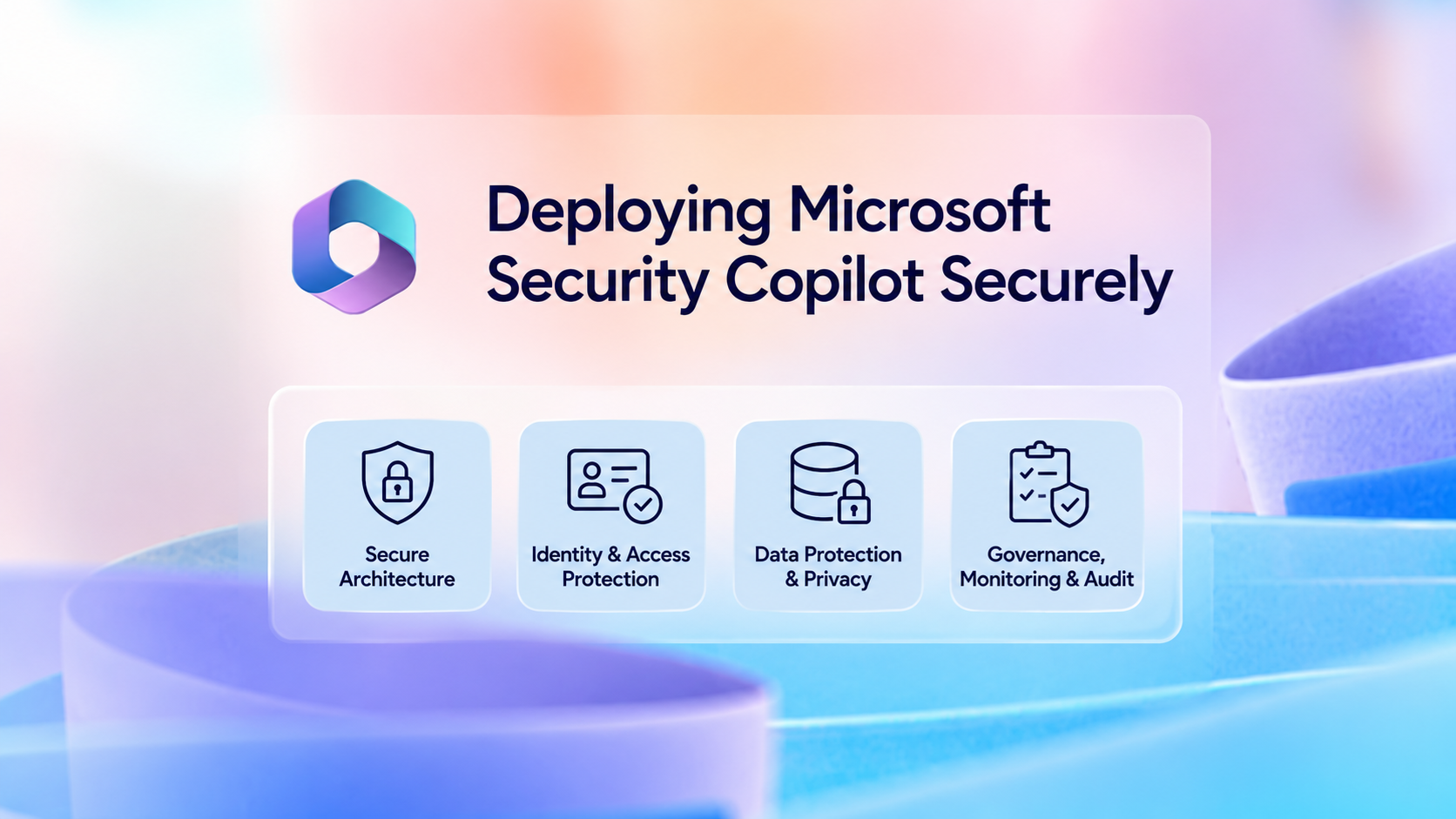
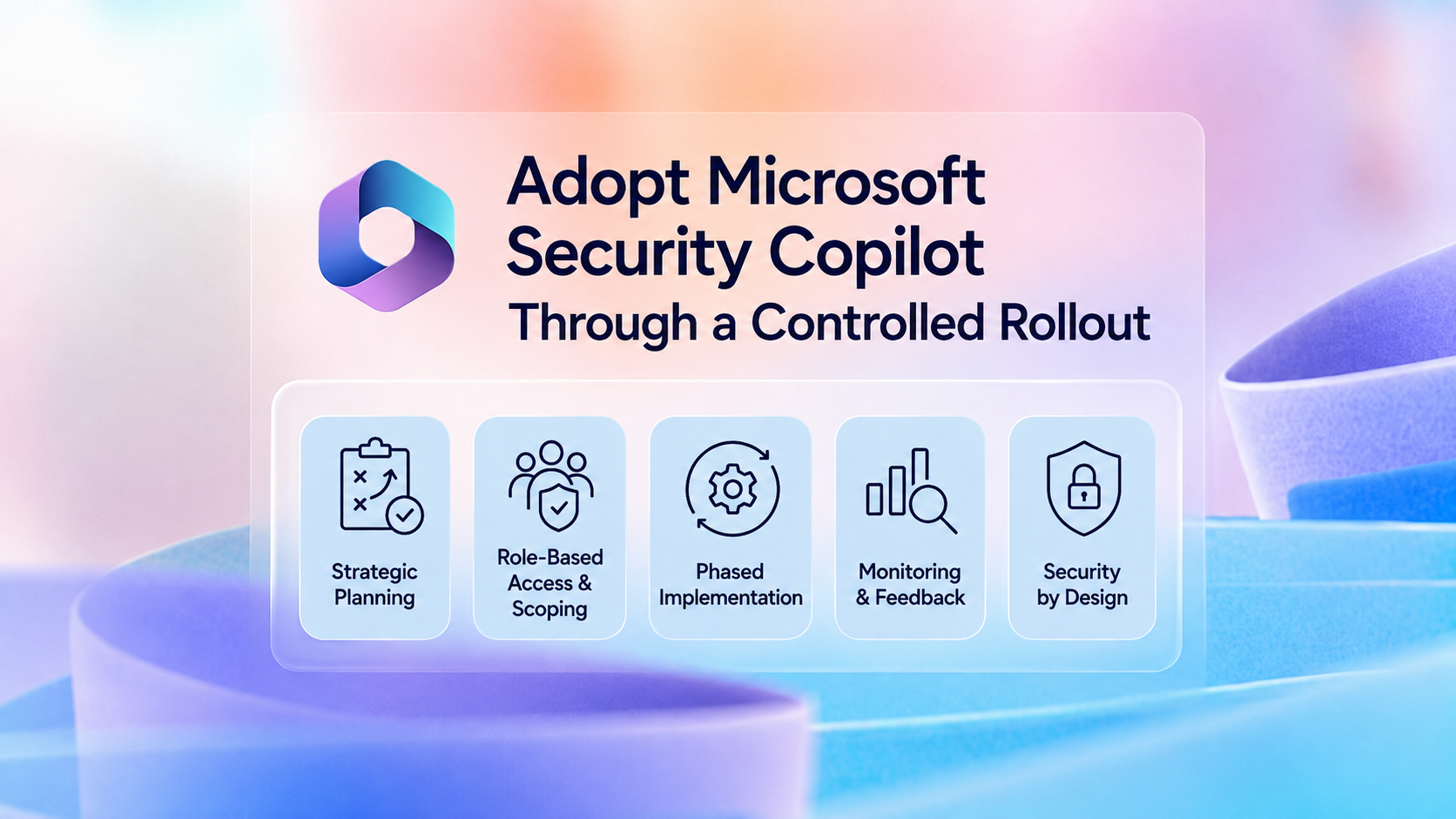
Microsoft Security Copilot can help security teams accelerate incident investigation, phishing analysis, threat hunting, identity investigation, device assessment, and security operations. However, enabling the platform without a clear access, agent, plugin, audit, data-protection, and capacity model can introduce operational, security, and financial risks.
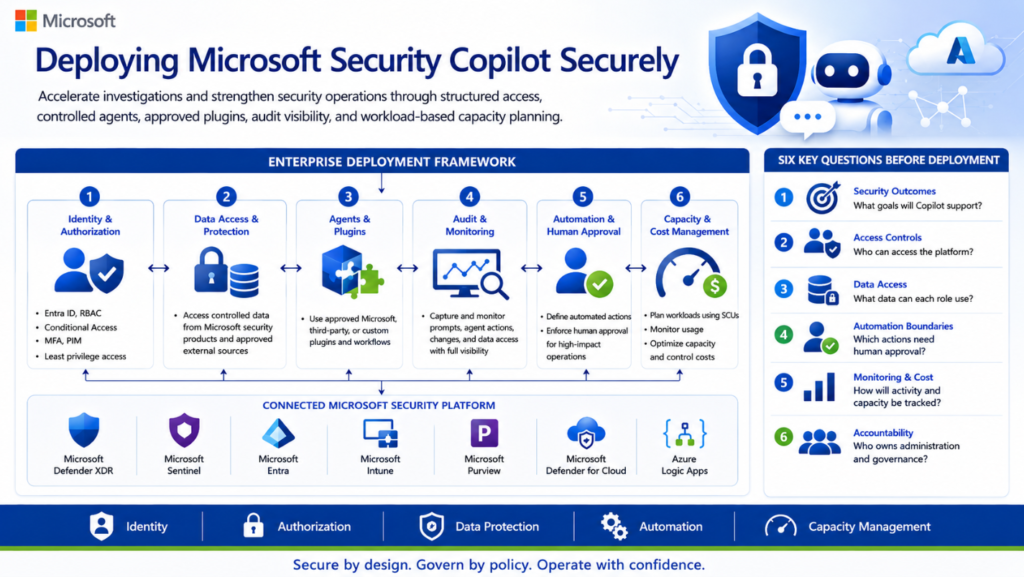
This article presents a practical enterprise approach for deploying Microsoft Security Copilot using layered role-based access control, least-privilege permissions, controlled agents and plugins, audit visibility, human-approval boundaries, and workload-based capacity planning.
Deploying Microsoft Security Copilot is not simply an AI enablement exercise. It should be treated as an enterprise security-platform implementation involving identity, authorization, data access, agents, plugins, audit, automation, capacity, cost, and operational accountability.
Before enabling the platform broadly, organizations should answer six questions:
Which security and operational outcomes will Security Copilot support?
Which users, agents, and applications will be permitted to access the platform?
What organizational data can each user, agent, plugin, or workflow access?
Which actions can run automatically, and which actions require human approval?
How will prompts, agent activity, configuration changes, capacity, and cost be monitored?
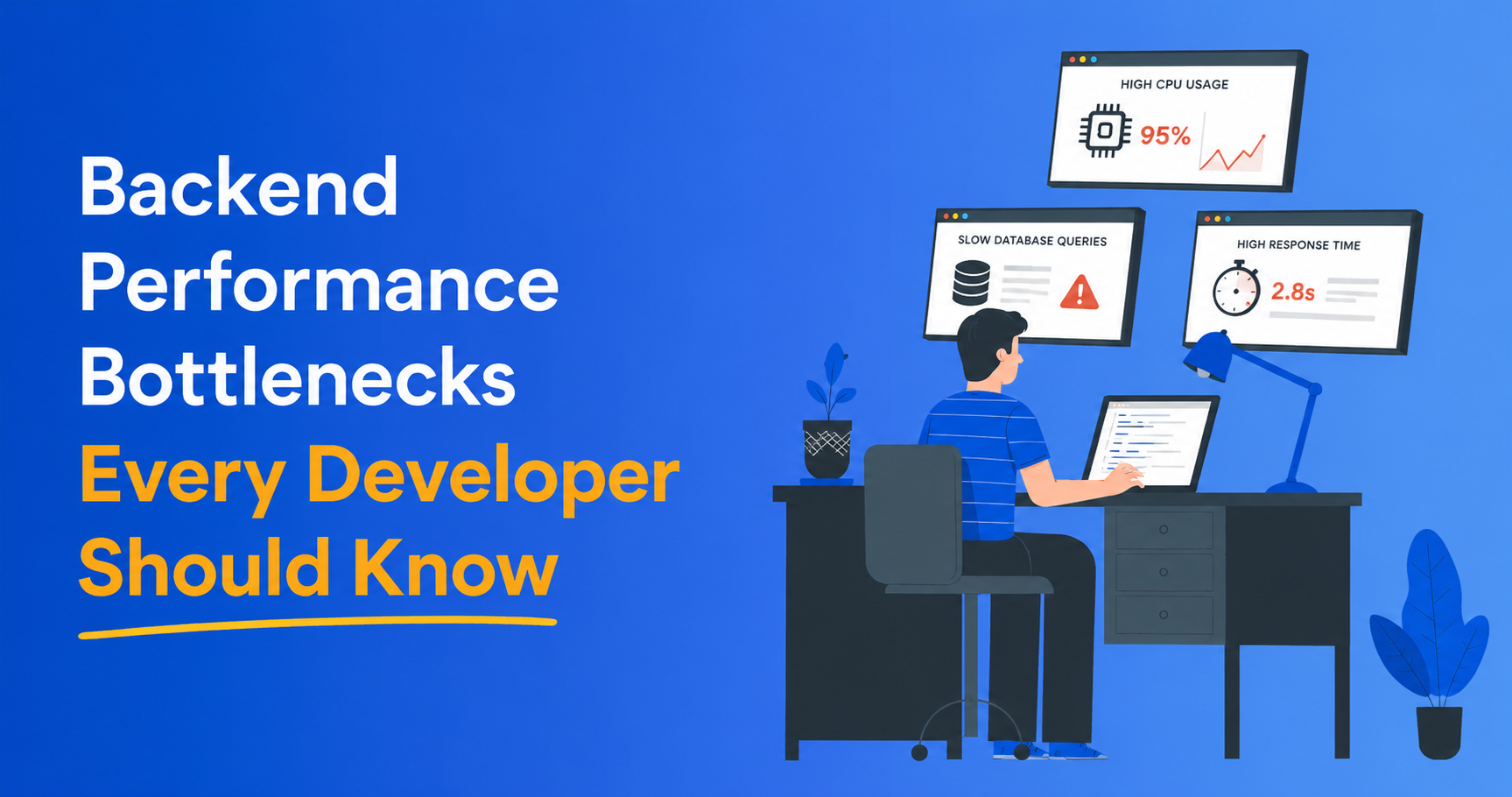
9 Backend Performance Bottlenecks Developers Often Ignore
Backend systems rarely fail because of one dramatic defect. Performance usually degrades through small inefficiencies that remain invisible in development and multiply under production traffic. Slow queries, blocked threads, stale caches, retry storms and memory growth can increase latency and infrastructure cost long before an outage occurs.
The following bottlenecks deserve continuous monitoring in modern APIs, distributed systems and AI-enabled platforms.
N+1 Queries Multiply Database Load
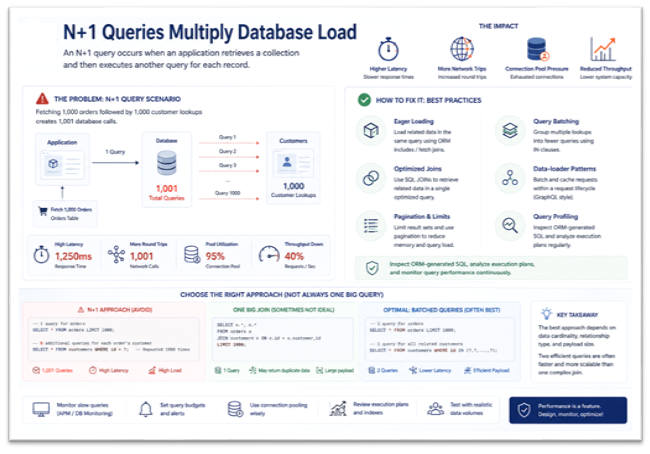
An N+1 query occurs when an application retrieves a collection and then executes another query for each record.
Fetching 1,000 orders followed by 1,000 customer lookups creates 1,001 database calls. The result is higher latency, additional network round trips and connection-pool pressure.
Developers should inspect ORM-generated SQL and use:
Eager loading
Query batching
Optimized joins
Data-loader patterns
Pagination and result limits
Query profiling
The objective is not always one large query. Two efficient batched queries may perform better than a complex join, depending on data cardinality and payload size.
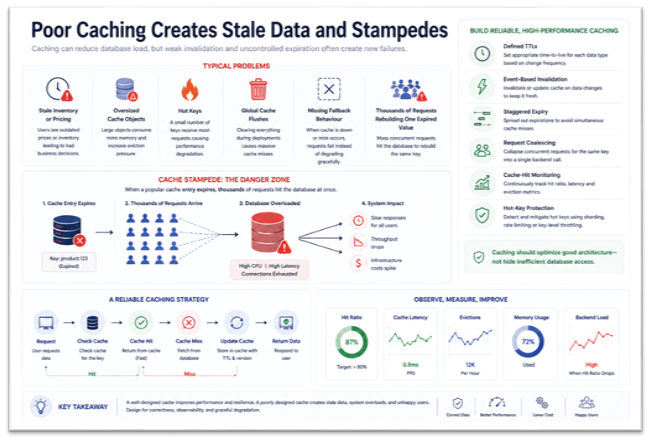
Poor Caching Creates Stale Data and Stampedes
Caching can reduce database load, but weak invalidation and uncontrolled expiration often create new failures.
Typical problems include:
Stale inventory or pricing
Oversized cache objects
Hot keys
Global cache flushes
Missing fallback behaviour
Thousands of requests rebuilding one expired value
That final scenario is a cache stampede. It can overload the database within seconds.
Reliable caching requires defined TTLs, event-based invalidation, staggered expiry, request coalescing, cache-hit monitoring and protection against hot-key concentration.
Caching should optimize good architecture—not hide inefficient database access.
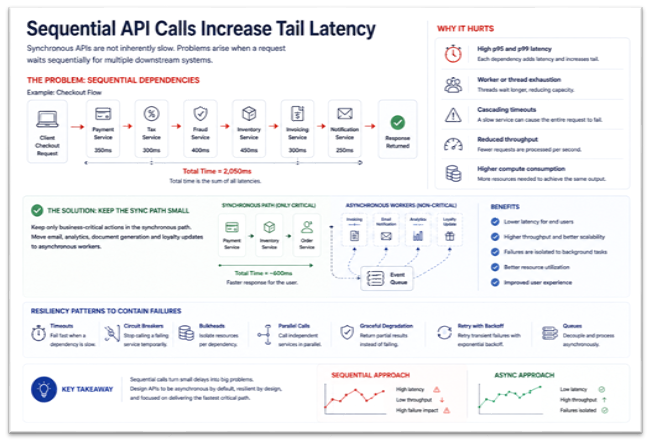
3. Sequential API Calls Increase Tail Latency
Synchronous APIs are not inherently slow. Problems arise when a request waits sequentially for multiple downstream systems.
A checkout operation might call payment, tax, fraud, inventory, invoicing and notification services. Even moderate latency in each dependency can push total response time into several seconds.
This causes:
High p95 and p99 latency
Worker or thread exhaustion
Cascading timeouts
Reduced throughput
Higher compute consumption
Keep only business-critical actions in the synchronous path. Move email, analytics, document generation and loyalty updates to asynchronous workers.
Use timeouts, circuit breakers, bulkheads, parallel calls, queues and graceful degradation to contain failures.
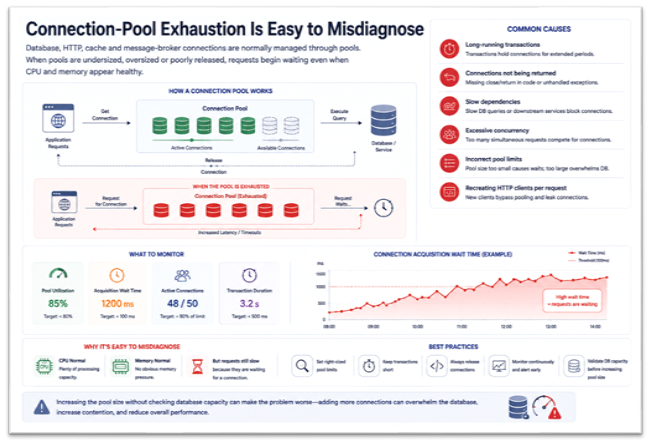
Connection-Pool Exhaustion Is Easy to Misdiagnose
Database, HTTP, cache and message-broker connections are normally managed through pools. When pools are undersized, oversized or poorly released, requests begin waiting even when CPU and memory appear healthy.
Common causes include:
Long-running transactions
Connections not being returned
Slow dependencies
Excessive concurrency
Incorrect pool limits
Recreating HTTP clients per request
Monitor pool utilization, acquisition wait time, active connections and transaction duration. Increasing the pool size without checking database capacity can make the problem worse.
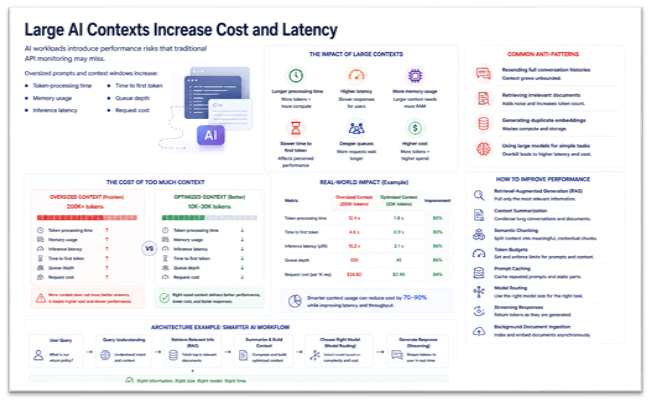
5. Large AI Contexts Increase Cost and Latency
AI workloads introduce performance risks that traditional API monitoring may miss.
Oversized prompts and context windows increase:
Token-processing time
Memory usage
Inference latency
Time to first token
Queue depth
Request cost
Common anti-patterns include resending full conversation histories, retrieving irrelevant documents, generating duplicate embeddings and using large models for simple tasks.
Improve performance through:
Retrieval-augmented generation
Context summarization
Semantic chunking
Token budgets
Prompt caching
Model routing
Streaming responses
Background document ingestion
Relevant context is more valuable than maximum context.
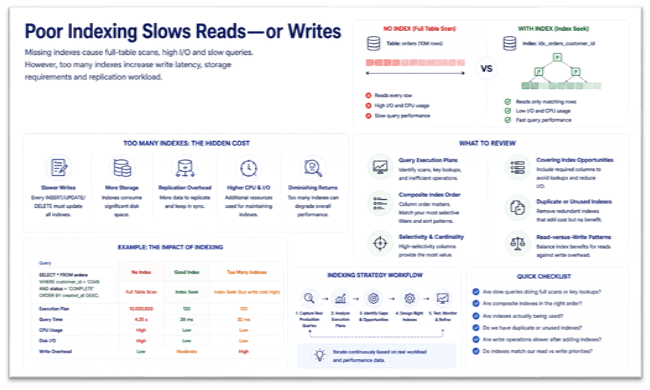
6. Poor Indexing Slows Reads—or Writes
Missing indexes cause full-table scans, high I/O and slow queries. However, too many indexes increase write latency, storage requirements and replication workload.
Review:
Query execution plans
Composite index order
Selectivity and cardinality
Covering-index opportunities
Duplicate or unused indexes
Read-versus-write patterns
Indexes should be designed from real production queries, not assumptions made during initial development.
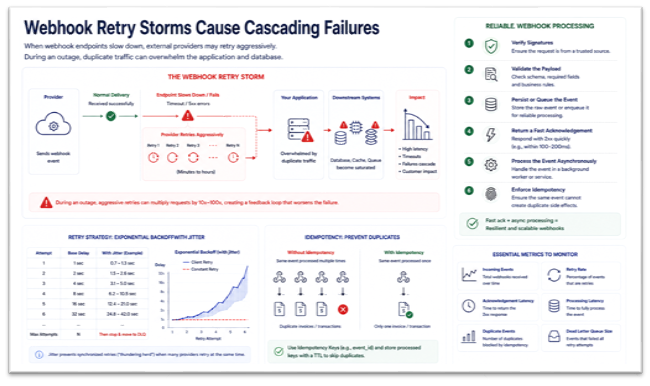
7. Webhook Retry Storms Cause Cascading Failures
When webhook endpoints slow down, external providers may retry aggressively. During an outage, duplicate traffic can overwhelm the application and database.
Reliable webhook processing should:
Verify signatures.
Validate the payload.
Persist or queue the event.
Return a fast acknowledgement.
Process the event asynchronously.
Enforce idempotency.
Retries should use exponential backoff, jitter, maximum-attempt limits and dead-letter queues. A repeated payment event must never create duplicate invoices or transactions.
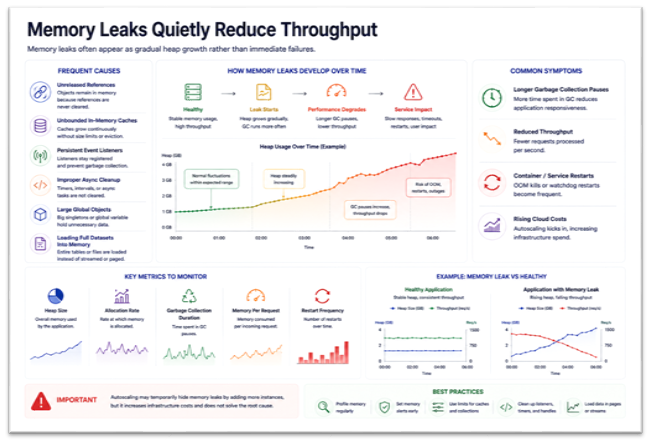
8. Memory Leaks Quietly Reduce Throughput
Frequent causes include:
Unreleased references
Unbounded in-memory caches
Persistent event listeners
Improper async cleanup
Large global objects
Loading full datasets into memory
Symptoms include longer garbage-collection pauses, reduced throughput, container restarts and rising cloud costs.
Monitor heap size, allocation rate, garbage-collection duration, memory per request and restart frequency. Autoscaling may temporarily hide the problem while increasing infrastructure spend.
9. Queue Failures Break Distributed Workflows
Queues often fail silently while applications continue accepting requests.
Risks include:
Consumer lag
Poison messages
Duplicate delivery
Unbounded retries
Queue starvation
Incorrect acknowledgements
Missing backpressure
Track queue depth, message age, retry volume and consumer throughput. Use dead-letter queues, poison-message isolation, retry limits, consumer autoscaling, idempotent handlers and recovery procedures.
Publishing a message confirms delivery to the broker—not completion of the business process.
Performance Engineering Must Be Continuous
Backend optimization is not a one-time pre-release task. Teams should continuously monitor:
Query count and execution time
p95 and p99 API latency
Cache hit ratio
Connection-pool wait time
Queue depth and message age
Heap and garbage collection
Retry frequency
AI token usage and inference latency
Cost per transaction
Scalable platforms are not built by adding larger servers whenever performance drops. They are built through profiling, observability, failure isolation, backpressure and disciplined architecture.
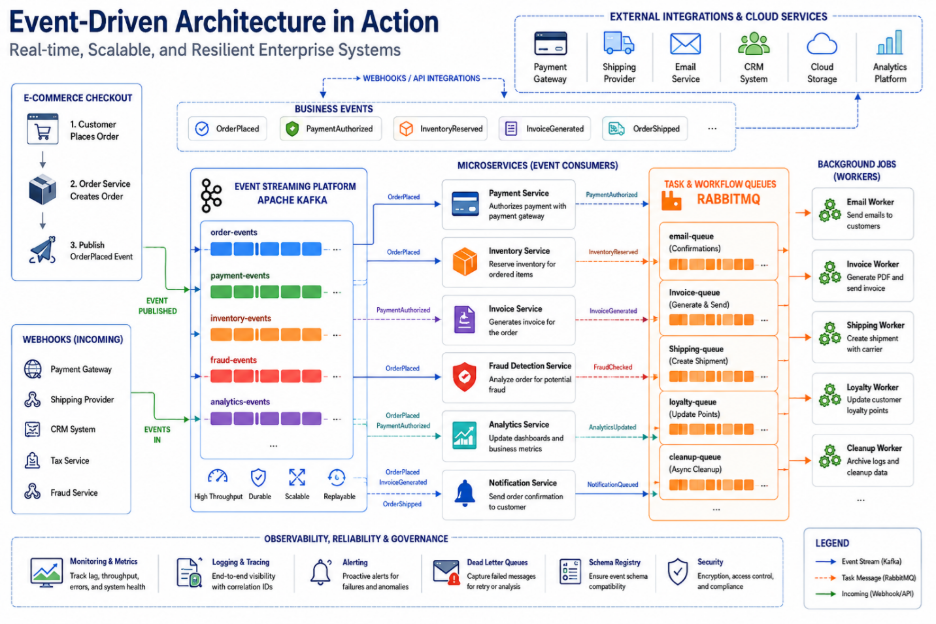
Modern enterprise applications are expected to process millions of transactions, integrate with dozens of external systems, and deliver real-time experiences across web, mobile, and cloud platforms. Traditional request-response architectures often struggle to meet these demands because every service depends on another to complete a transaction.
Imagine an e-commerce checkout. Beyond placing an order, the system must authorize payment, reserve inventory, generate an invoice, notify the customer, update analytics, and trigger fraud detection. Executing all of these tasks synchronously increases response times and creates single points of failure.
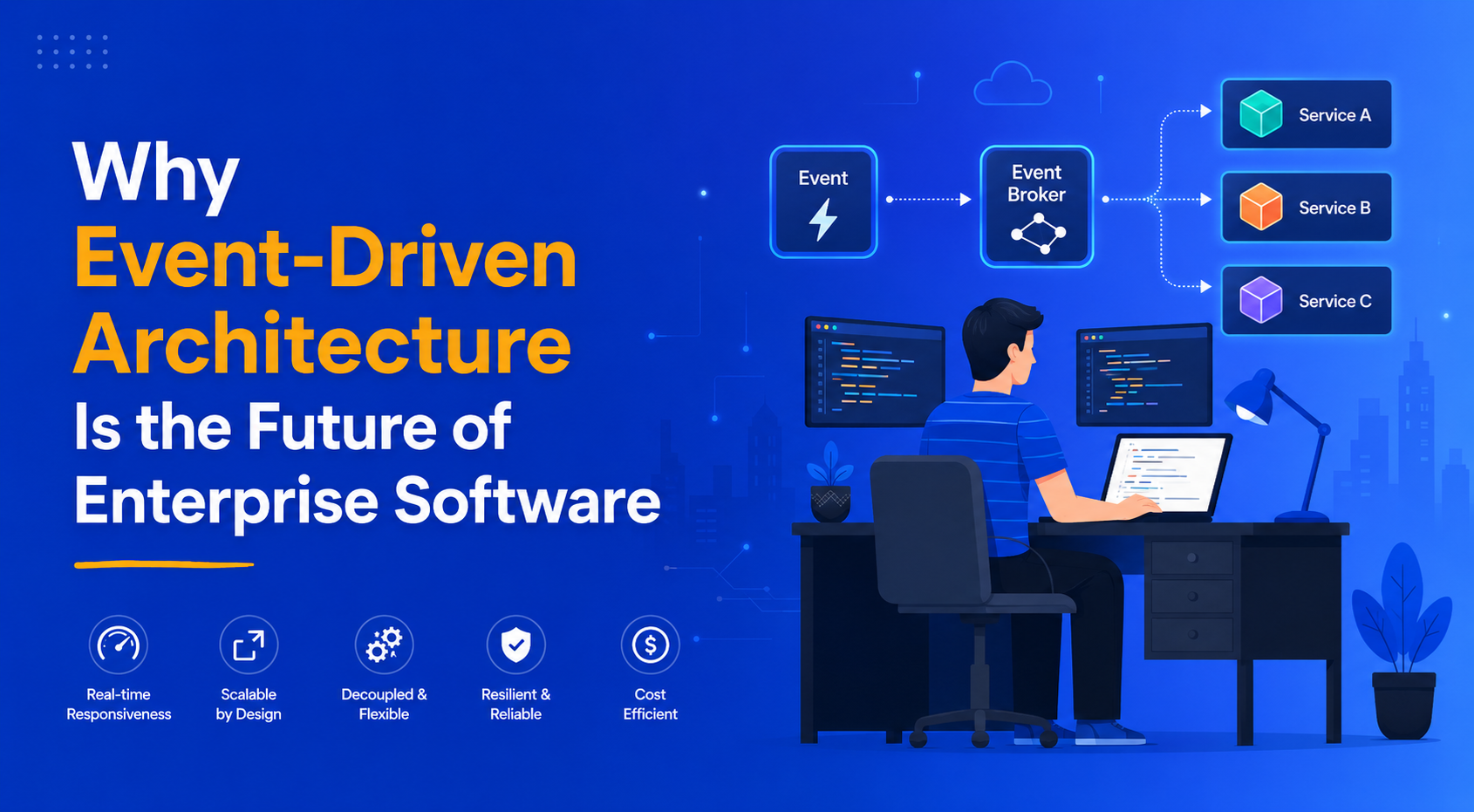
This is where Event-Driven Architecture (EDA) has become the preferred approach. Instead of waiting for every operation to finish, applications publish events—such as OrderPlaced or PaymentAuthorized—allowing independent services to process them asynchronously.
The result is faster, more scalable, and resilient applications, making EDA a core architectural pattern for modern enterprise software.
Why Event-Driven Architecture Matters
At its core, Event-Driven Architecture decouples services. One application publishes an event, while multiple downstream systems subscribe and react independently without tightly coupling business logic.
This approach delivers several enterprise benefits:
Improved scalability by allowing each service to scale independently.
Higher resilience because downstream failures don’t interrupt customer-facing operations.
Faster response times through asynchronous processing.
Real-time automation for notifications, analytics, fraud detection, and business workflows.
Simpler integrations across cloud platforms, SaaS applications, and microservices.
Whether building fintech platforms, e-commerce marketplaces, SaaS products, or IoT solutions, event-driven systems enable organizations to respond to business events as they happen.
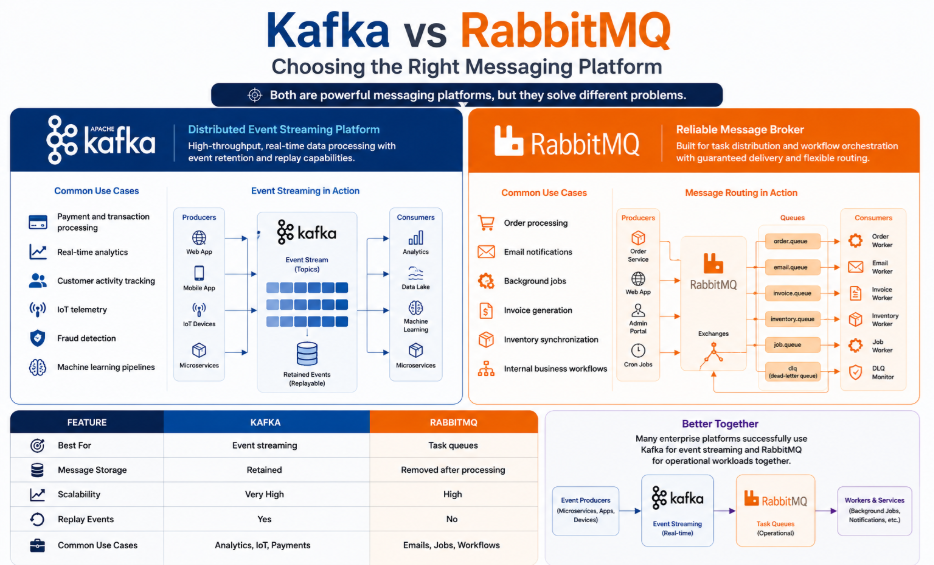
Kafka vs RabbitMQ: Choosing the Right Messaging Platform
Two technologies dominate enterprise event-driven systems: Apache Kafka and RabbitMQ. While both move messages between services, they solve different problems.
Apache Kafka
Kafka is a distributed event streaming platform designed for high-throughput, real-time data processing. Events are retained for a configurable period, allowing multiple consumers to process or replay them independently.
Kafka is commonly used for:
Payment and transaction processing
Real-time analytics
Customer activity tracking
IoT telemetry
Fraud detection
Machine learning pipelines
Large enterprises often use Kafka as an event backbone connecting hundreds of microservices and cloud applications.
RabbitMQ
RabbitMQ is a reliable message broker built for task distribution and workflow orchestration. Rather than storing long-term event streams, it focuses on guaranteed message delivery and flexible routing.
Typical RabbitMQ workloads include:
Order processing
Email notifications
Background jobs
Invoice generation
Inventory synchronization
Internal business workflows
Its support for acknowledgements, dead-letter queues, and routing patterns makes it an excellent choice for transactional systems.
Feature
Kafka
RabbitMQ
Best For
Event streaming
Task queues
Message Storage
Retained
Removed after processing
Scalability
Very High
High
Replay Events
Yes
No
Common Use Cases
Analytics, IoT, Payments
Emails, Jobs, Workflows
Many enterprise platforms successfully use Kafka for event streaming and RabbitMQ for operational workloads together.
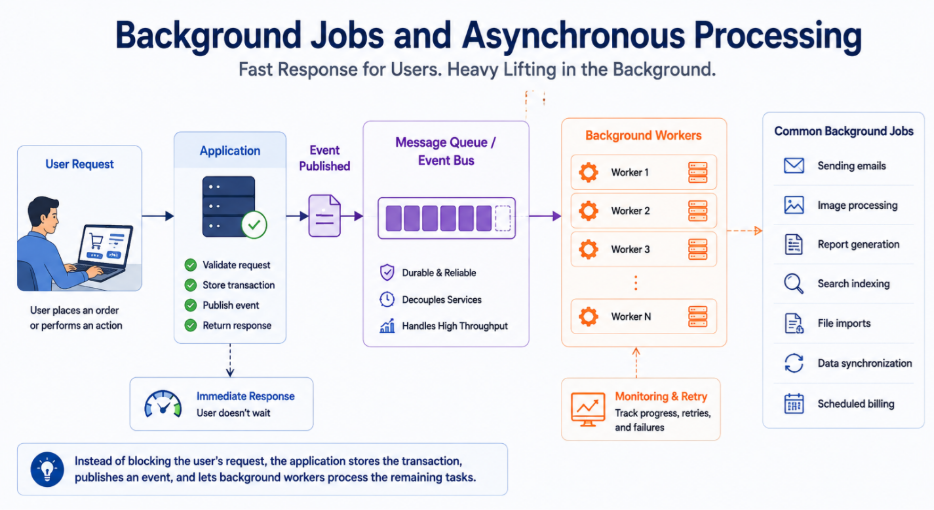
Background Jobs and Asynchronous Processing
Not every operation should happen while a customer waits.
Background jobs move time-consuming work into worker processes, allowing applications to respond immediately while completing additional tasks behind the scenes.
Common background jobs include:
Sending emails
Image processing
Report generation
Search indexing
File imports
Data synchronization
Scheduled billing
Instead of blocking a user’s request, the application stores the transaction, publishes an event, and lets background workers process the remaining tasks.
This approach significantly improves responsiveness while enabling applications to scale under heavy workloads.
Webhooks and Reliable Retry Systems
Modern applications communicate with numerous external services including payment gateways, CRM platforms, logistics providers, and SaaS applications.
Most of these integrations rely on webhooks, where external systems notify your application whenever an important event occurs.
Examples include:
Payment completed
Shipment dispatched
Customer updated
Repository committed
SMS delivered
Because external networks are unreliable, webhook processing should always include:
Signature validation
HTTPS encryption
Idempotent processing
Fast acknowledgement
Asynchronous execution
Failures are inevitable in distributed systems, making robust retry mechanisms equally important.
Best practices include:
Exponential backoff
Randomized retry intervals (jitter)
Maximum retry limits
Dead-letter queues
Duplicate event protection
These patterns ensure temporary failures don’t become business failures.
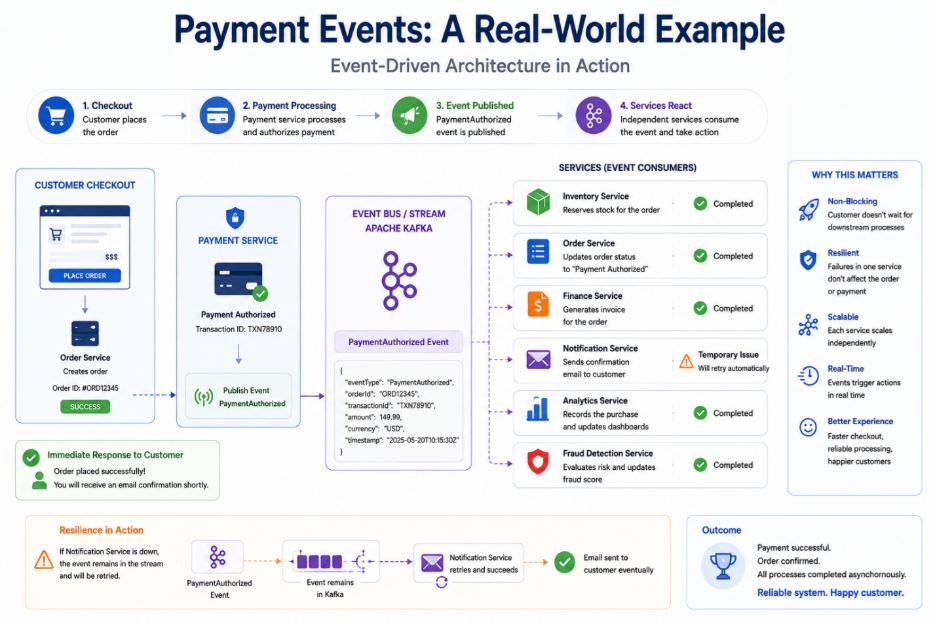
Payment Events: A Real-World Example
Payment processing demonstrates why Event-Driven Architecture is so valuable.
After a customer completes checkout, the payment service publishes a Payment Authorized event.
Independent services then react automatically:
Inventory reserves stock.
The order service updates status.
Finance generates an invoice.
Notifications send confirmation emails.
Analytics records the purchase.
Fraud detection evaluates risk.
Each service works independently without delaying the customer experience.
Even if the notification service experiences temporary issues, the payment and order remain successful because downstream processing continues asynchronously.
This architecture improves both reliability and customer satisfaction.
Best Practices for Enterprise Event-Driven Systems
Technology alone does not create a successful event-driven platform.
Organizations should establish governance around:
Event naming standards
Schema versioning
Service ownership
Monitoring and observability
Security and access control
Event retention policies
Consumer responsibilities
Applications should also be designed to handle duplicate or out-of-order events using idempotent processing techniques.
Strong operational discipline is what transforms messaging platforms into reliable enterprise infrastructure.
Conclusion
Event-Driven Architecture has evolved from a niche backend pattern into a standard approach for building modern enterprise applications.
Apache Kafka enables scalable event streaming, RabbitMQ provides reliable workflow messaging, background jobs improve responsiveness, webhooks connect external platforms, and retry systems ensure resilience when failures occur.
Rather than forcing every operation into a single synchronous request, organizations can process events independently, improving scalability, availability, and user experience.
As enterprises continue adopting microservices, cloud-native platforms, AI, and real-time analytics, Event-Driven Architecture will remain a foundational capability for delivering secure, resilient, and highly scalable software.
Organizations that invest in well-designed event-driven systems today will be better equipped to meet tomorrow’s performance, integration, and operational challenges.
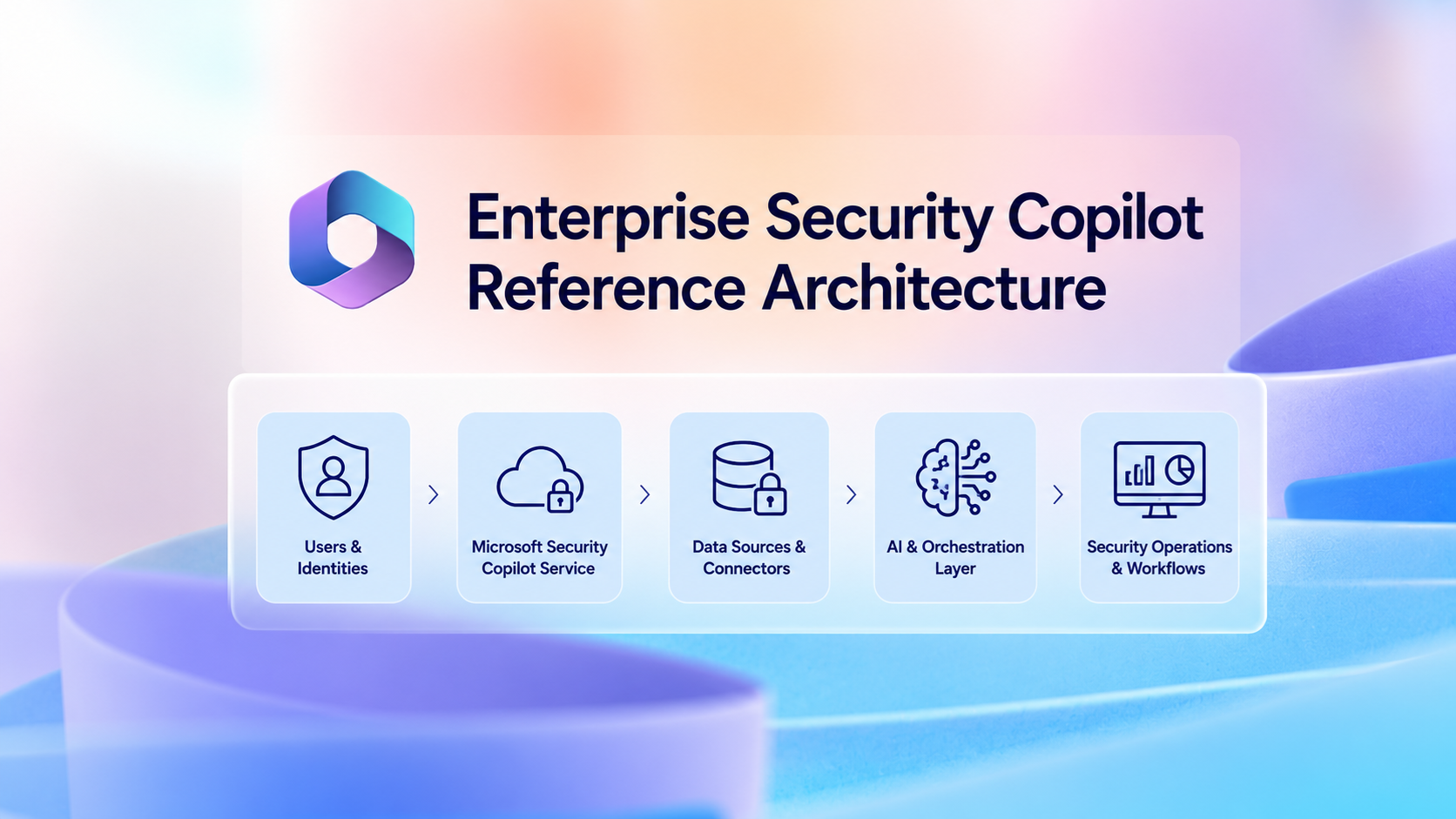
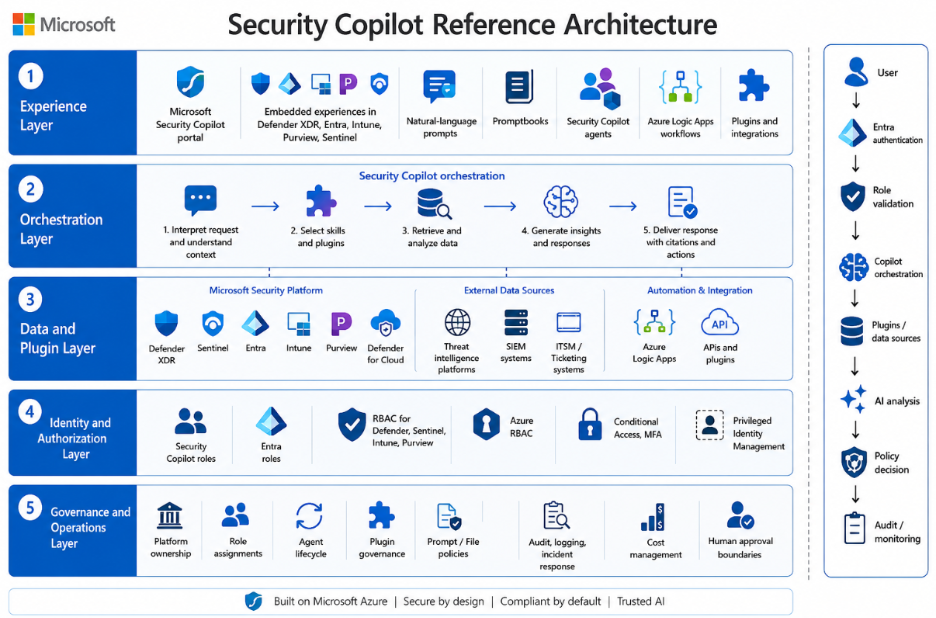
A practical Security Copilot architecture contains five layers.
Experience layer
Users and security workflows can interact with Security Copilot through:
The standalone Microsoft Security Copilot portal.
Embedded experiences within supported Microsoft security products, including Microsoft Defender XDR, Microsoft Entra, Microsoft Intune, Microsoft Purview, and Microsoft Sentinel.
Natural-language prompts.
Promptbooks.
Security Copilot agents.
Supported Azure Logic Apps and automation workflows.
Approved plugins and custom integrations.
Orchestration layer
Security Copilot interprets the user, promptbook, workflow, or agent request and selects the relevant skills, plugins, and connected data sources. It then analyzes the available information and produces a response, recommendation, investigation summary, enrichment result, or proposed action.
The quality of the result depends on the user’s permissions, available data, plugin configuration, prompt design, and the accuracy and freshness of the connected data sources.
Data and plugin layer
Depending on licensing, configuration, supported integrations, and user permissions, Security Copilot can access or interact with:
Microsoft Defender XDR.
Microsoft Sentinel.
Microsoft Entra.
Microsoft Intune.
Microsoft Purview.
Microsoft Defender for Cloud.
Threat-intelligence platforms.
Security information and event management platforms.
IT service-management and ticketing systems.
Azure Logic Apps workflows.
Approved Microsoft, third-party, and custom plugins.
Approved APIs and external data sources.
Every plugin, connector, workflow, or custom API expands the organization’s data-access and trust boundary. Each integration should therefore be reviewed for permissions, data flow, authentication, logging, error handling, and write capabilities before production use.
Identity and authorization layer
Access to Security Copilot and connected organizational data depends on multiple authorization layers:
Security Copilot roles, including Owner and Contributor access.
Microsoft Entra roles and permissions.
Product-specific RBAC within Defender, Sentinel, Intune, Purview, and other connected services.
Azure RBAC for capacity resources, subscriptions, resource groups, and Logic Apps.
User-delegated permissions.
Agent, application, service-principal, managed-identity, and connector permissions.
Conditional Access and multifactor authentication.
Privileged Identity Management for elevated administrative access.
Security Copilot does not bypass the authorization controls of connected Microsoft or third-party services. A user or agent can only access data and perform actions permitted by the underlying service and configured integration.
Governance and operations layer
This layer covers:
Platform ownership and service accountability.
Security Copilot role assignments.
Agent lifecycle management.
Plugin and connector governance.
Prompt and file-upload policies.
Data-sharing and privacy settings.
Audit, logging, and investigation visibility.
Capacity, overage, budget, and cost management.
Change and release management.
Human-approval requirements.
Automated-action boundaries.
Incident response and service continuity.
Manual fallback and rollback procedures.
Regular access, agent, and plugin recertification.
A simplified data flow is:
User, promptbook, event, workflow, or agent trigger ↓ Microsoft Entra authentication and Conditional Access ↓ Security Copilot role and underlying product-permission validation ↓ Security Copilot orchestration ↓ Approved plugins, connectors, workflows, and data sources ↓ AI-assisted analysis, enrichment, recommendation, or proposed action ↓ Policy-based decision: human approval or approved automated action ↓ Audit, monitoring, capacity tracking, incident review, and continuous improvement
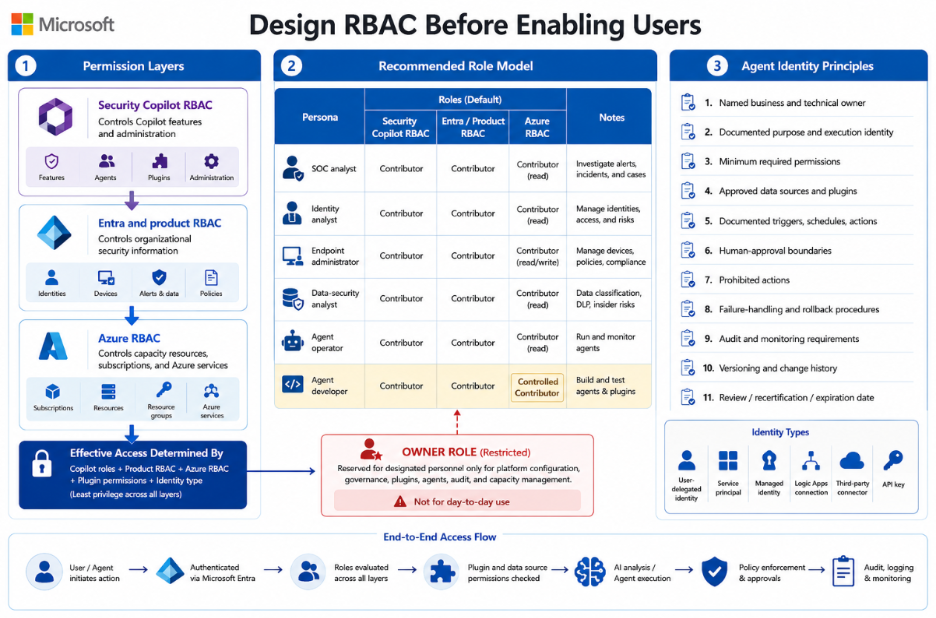
Security Copilot access and underlying workload access should be designed separately. For example, assigning the Security Copilot Contributor role allows a user to work within Security Copilot, but it does not automatically grant access to Defender incidents, Sentinel workspaces, Entra sign-in data, Intune devices, or Purview investigations.
The effective access available through Security Copilot is determined by the combination of Security Copilot roles, connected-product permissions, Azure permissions, plugin permissions, and the identity used by the user, agent, connector, or workflow.
Permission layer
Purpose
Security Copilot RBAC
Controls access to Copilot features and administration
Entra and product RBAC
Controls access to organizational security information
Azure RBAC
Controls capacity resources, subscriptions, and related Azure services
Recommended role model
Persona
Security Copilot role
SOC analyst
Contributor
Identity analyst
Contributor
Endpoint administrator
Contributor
Data-security analyst
Contributor
Agent operator
Contributor, where required
Agent developer
Controlled Contributor access
Security Copilot Owner access should be limited to designated personnel responsible for platform configuration, role assignments, plugins, agents, audit settings, capacity, and service governance.
Owner access should not be assigned as a standard day-to-day role. Where possible, privileged access should be activated through Microsoft Entra Privileged Identity Management, protected by phishing-resistant authentication, and reviewed regularly.
Agent identity principles
Every production agent should have:
A named business owner.
A named technical owner.
A clearly documented purpose and expected outcome.
A defined execution identity.
Minimum required permissions.
Approved data sources and plugins.
Documented triggers, schedules, and actions.
Defined human-approval boundaries.
Clear prohibited actions.
Tested failure-handling and rollback procedures.
Audit and monitoring requirements.
A version number and change history.
A review, recertification, or expiration date.
Before production approval, the organization should also document whether the agent operates through:
User-delegated permissions.
A service principal or application identity.
A managed identity.
An Azure Logic Apps connection.
A third-party connector.
An API key or stored credential.
Both the Security Copilot permissions and the effective permissions within every connected system should be reviewed.
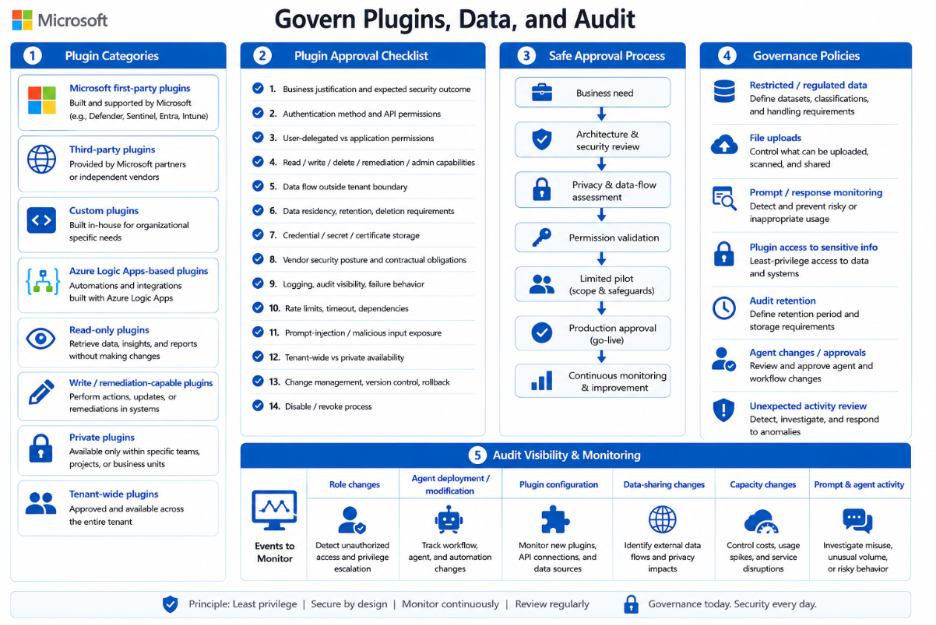
Plugins extend Security Copilot by providing additional data, skills, and actions. However, every plugin also introduces a new trust relationship and may expose sensitive organizational data to another Microsoft service, third-party platform, API, workflow, or credential store.
Organizations should distinguish between:
Microsoft first-party plugins.
Third-party plugins.
Custom plugins.
Azure Logic Apps-based plugins.
Read-only plugins.
Plugins that can perform write or remediation actions.
Private plugins.
Plugins published for broader tenant use.
Before approving a plugin, connector, workflow, or custom API, review:
The business justification and expected security outcome.
Authentication method and API permissions.
User-delegated versus application permissions.
Read, write, delete, remediation, and administrative capabilities.
Data transmitted outside the Microsoft tenant or service boundary.
Data residency, retention, and deletion requirements.
Credential, secret, certificate, and connection storage.
Vendor security posture and contractual obligations.
Logging, audit visibility, and failure behaviour.
Rate limits, timeout behaviour, and service dependencies.
Prompt-injection and malicious-input exposure.
Tenant-wide versus private availability.
Change management, version control, and rollback capability.
The process for disabling or revoking the integration.
A safe approval process is:
Business need ↓ Architecture and security review ↓ Privacy and data-flow assessment ↓ Permission validation ↓ Limited pilot ↓ Production approval ↓ Continuous monitoring
Organizations should also define what users may enter into Security Copilot prompts.
Governance policies should address:
Restricted and regulated data.
File uploads.
Prompt and response monitoring.
Plugin access to sensitive information.
Audit retention.
Agent changes and approvals.
Review of unexpected activity.
Audit visibility can be supported through Microsoft Purview auditing, DSPM for AI, and related management APIs, depending on licensing and configuration.
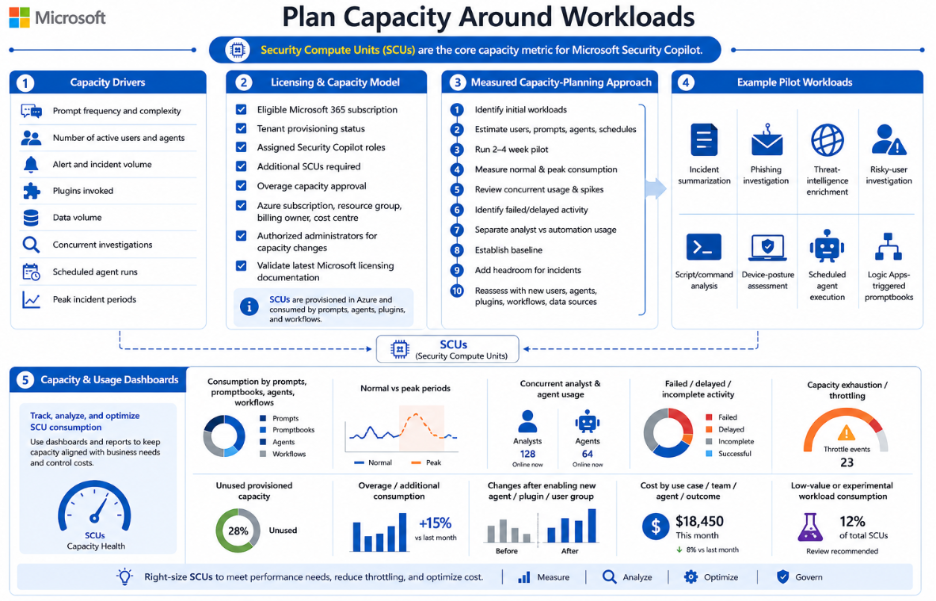
Security Copilot availability and capacity depend on the organization’s current Microsoft licensing and capacity model.
Before deployment, confirm:
Whether the tenant is entitled to Security Copilot through an eligible Microsoft 365 subscription.
Whether Security Copilot has already been provisioned or enabled in the tenant.
Which users or groups received Security Copilot roles.
Whether additional provisioned Security Compute Units are required.
Whether overage capacity is permitted and financially approved.
Which Azure subscription, resource group, billing owner, and cost centre will own billable capacity.
Which administrators are authorized to increase, reduce, or remove capacity.
Because licensing, included capacity, provisioning, and overage terms may change, organizations should validate the latest Microsoft licensing and capacity documentation during design and before production rollout.
Use a measured capacity-planning approach
Security Copilot should be sized through measured pilot usage rather than employee count or an assumed SCU-per-prompt formula.
A practical sizing approach is:
Identify the initial Security Copilot workloads.
Estimate the expected number of users, prompts, promptbooks, agents, and scheduled executions.
Run a representative pilot for two to four weeks.
Measure normal and peak capacity consumption.
Review concurrent usage and incident-spike behavior.
Identify failed or delayed activity caused by insufficient capacity.
Separate interactive analyst usage from scheduled agent and automation consumption.
Establish an operational baseline.
Add approved headroom for major incidents and peak periods.
Reassess capacity whenever new users, agents, plugins, workflows, or data sources are introduced.
Example pilot workloads may include:
Incident summarization.
Phishing investigation.
Threat-intelligence enrichment.
Risky-user investigation.
Script and command analysis.
Device-posture assessment.
Scheduled agent execution.
Logic Apps-triggered promptbooks.
Capacity and usage dashboards should be reviewed for:
Consumption by interactive prompts, promptbooks, agents, and automated workflows.
Normal versus peak consumption periods.
Concurrent analyst and agent usage.
Failed, delayed, or incomplete activity.
Capacity exhaustion or throttling.
Unused provisioned capacity.
Overage or additional consumption.
Consumption changes after enabling a new agent, plugin, or user group.
Cost by use case, team, agent, or operational outcome.
Capacity consumed by low-value or experimental workloads.
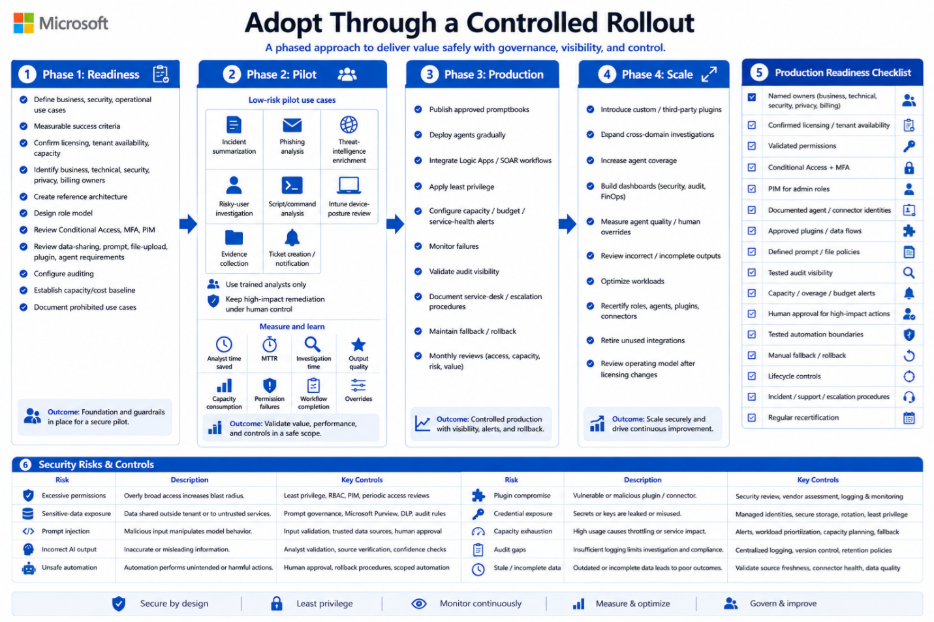
Define business, security, and operational use cases.
Define measurable success criteria.
Confirm licensing, tenant availability, and capacity options.
Confirm whether Security Copilot has already been provisioned.
Identify business, technical, security, privacy, and billing owners.
Create the reference architecture.
Design the Security Copilot and underlying product-role model.
Review Conditional Access, MFA, and PIM requirements.
Review data-sharing, prompt, file-upload, plugin, and agent requirements.
Configure and validate auditing.
Establish an initial capacity and cost baseline.
Document prohibited use cases and high-impact actions.
Phase 2: Pilot
Begin with low-risk, measurable use cases such as:
Incident summarization.
Phishing-email analysis.
Threat-intelligence enrichment.
Risky-user investigation.
Script and command analysis.
Intune device-posture review.
Evidence collection.
Ticket creation and notification.
Use a limited group of trained analysts. Keep identity disabling, device isolation, policy modification, data deletion, access revocation, and other high-impact remediation actions under human control.
During the pilot, measure:
Analyst time saved.
Mean time to triage.
Mean time to investigate.
Output quality and required corrections.
Capacity consumption.
Permission failures.
Agent and workflow completion rates.
Human overrides.
Unsupported or incorrect conclusions.
Phase 3: Production
Publish approved and version-controlled promptbooks.
Deploy approved agents gradually.
Integrate approved Azure Logic Apps and SOAR workflows.
Apply least-privilege access.
Configure capacity, budget, and service-health alerts.
Monitor agent, plugin, and workflow failures.
Validate audit visibility.
Document service-desk and escalation procedures.
Maintain manual fallback and rollback procedures.
Conduct monthly access, capacity, risk, and value reviews.
Phase 4: Scale
Introduce approved custom and third-party plugins.
Expand cross-domain investigations.
Increase agent coverage based on measured value.
Build security, audit, operational, and FinOps dashboards.
Measure agent completion quality and human-override rates.
Review incorrect, incomplete, and unsupported outputs.
Optimize low-value or high-consumption workloads.
Recertify roles, agents, plugins, connectors, and workflows regularly.
Retire unused agents and integrations.
Review the operating model after major platform or licensing changes.
Production readiness checklist
A production Security Copilot service should not proceed without:
Named business, technical, security, privacy, and billing owners.
Confirmed licensing and tenant availability.
Validated Security Copilot and underlying product permissions.
Conditional Access and MFA protection.
PIM for privileged administrative roles.
Documented agent and connector identities.
Approved plugins and data flows.
Defined prompt and file-upload policies.
Tested audit and investigation visibility.
Capacity, overage, budget, and alert thresholds.
Human-approval requirements for high-impact actions.
Tested automated-action boundaries.
Manual fallback and rollback procedures.
Agent, plugin, connector, and workflow lifecycle controls.
Documented incident, support, and escalation procedures.
Regular role, agent, and integration recertification.
Security Risks and Control Considerations
Security Copilot introduces risks that should be considered during architecture, pilot, and production reviews.
Risk
Example
Recommended control
Excessive permissions
A user retrieves more security data than required for their role
Least privilege, scoped product RBAC, PIM, and regular access reviews
Sensitive-data exposure
A prompt or uploaded file contains confidential or regulated information
Prompt governance, file-upload rules, Purview controls, and restricted audit access
Prompt injection
Malicious content attempts to influence an agent or plugin
Input validation, trusted data sources, limited write permissions, and human approval
Incorrect AI output
A generated conclusion appears credible but is incomplete or inaccurate
Analyst validation, source verification, testing, and quality measurement
Unsafe automation
An agent disables an account or changes a policy based on incomplete evidence
Human approval for high-impact actions and tested rollback procedures
Plugin compromise
A third-party or custom plugin exposes or manipulates data
Security review, minimum permissions, vendor assessment, logging, and revocation process
Credential exposure
API keys or secrets are stored insecurely or written to logs
Managed identities, secure secret storage, credential rotation, and log review
Capacity exhaustion
Scheduled agents consume available capacity during a major incident
Capacity alerts, workload prioritization, overage controls, and manual fallback
Audit gaps
Agent or plugin changes cannot be reconstructed
Centralized audit logging, change records, version control, and retention policies
Stale or incomplete data
Copilot produces a recommendation using delayed or partial telemetry
Validate source freshness, connector health, ingestion status, and data completeness
Conclusion
Microsoft Security Copilot can become an important part of an enterprise security architecture, but only when it is deployed with the same discipline applied to other critical security platforms.
A secure and sustainable implementation should combine:
Layered role-based access control.
Least-privilege user and agent identities.
Controlled plugins, connectors, and workflows.
Clear prompt and data-protection policies.
Audit and investigation visibility.
Workload-based capacity and cost planning.
Human approval for high-impact actions.
Controlled automation for low-risk activities.
Manual fallback and rollback procedures.
Continuous measurement and improvement.
The most successful organizations will not necessarily be those that deploy the largest number of agents or automate the highest number of tasks. They will be the organizations that connect Security Copilot to measurable security outcomes while keeping the platform secure, governed, observable, resilient, and financially controlled.