Deploying Microsoft Security Copilot Securely

Strategy → Architecture → Access → Governance → Capacity → Adoption

Executive Summary

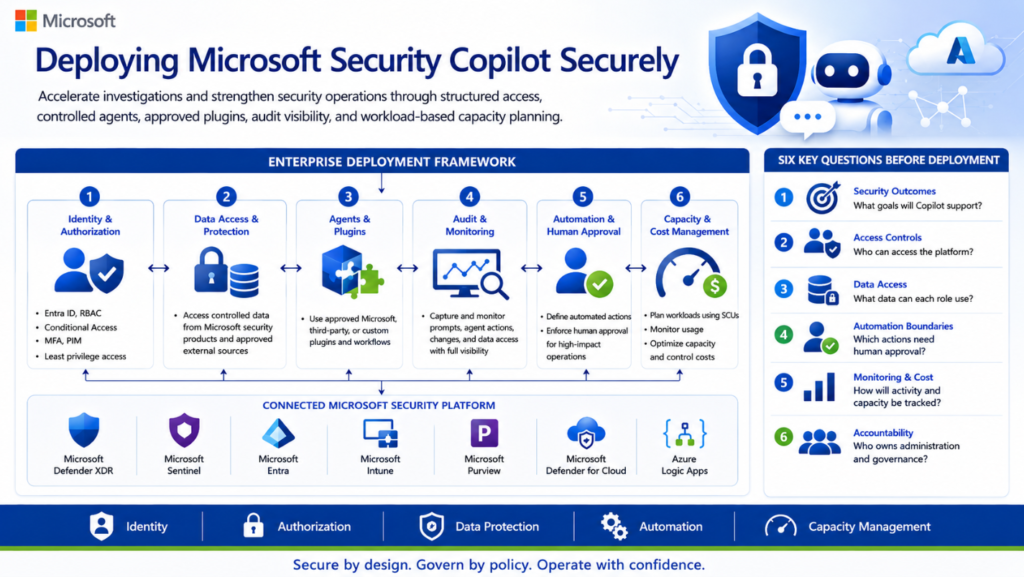
Microsoft Security Copilot can help security teams accelerate incident investigation, phishing analysis, threat hunting, identity investigation, device assessment, and security operations. However, enabling the platform without a clear access, agent, plugin, audit, data-protection, and capacity model can introduce operational, security, and financial risks.

This article presents a practical enterprise approach for deploying Microsoft Security Copilot using layered role-based access control, least-privilege permissions, controlled agents and plugins, audit visibility, human-approval boundaries, and workload-based capacity planning.

Deploying Microsoft Security Copilot is not simply an AI enablement exercise. It should be treated as an enterprise security-platform implementation involving identity, authorization, data access, agents, plugins, audit, automation, capacity, cost, and operational accountability.

Before enabling the platform broadly, organizations should answer six questions:

  1. Which security and operational outcomes will Security Copilot support?
  2. Which users, agents, and applications will be permitted to access the platform?
  3. What organizational data can each user, agent, plugin, or workflow access?
  4. Which actions can run automatically, and which actions require human approval?
  5. How will prompts, agent activity, configuration changes, capacity, and cost be monitored?

You’ve finished this article. Continue with Enterprise Security Copilot Reference Architecture to learn the next step.


Enterprise Security Copilot Reference Architecture


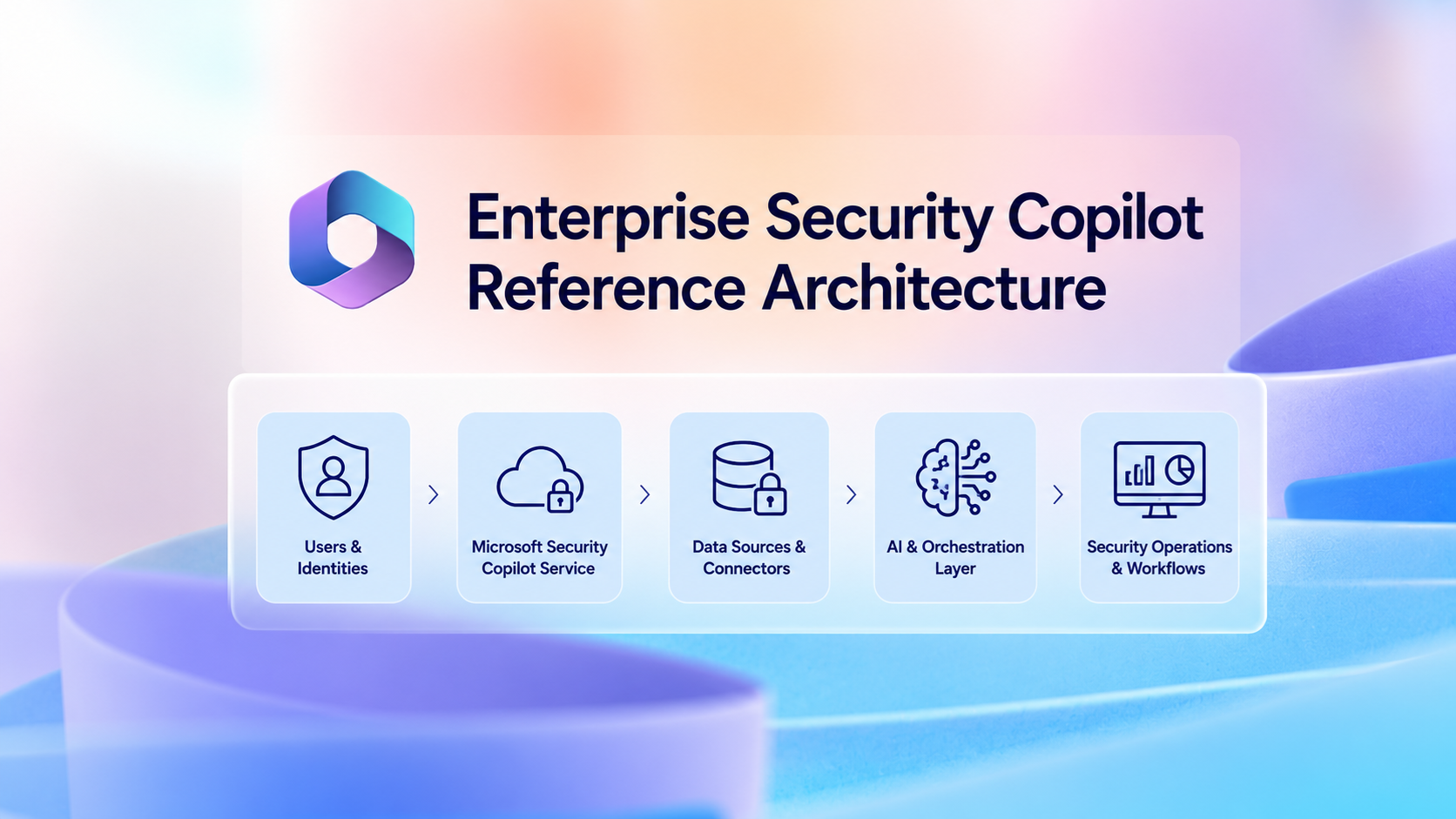
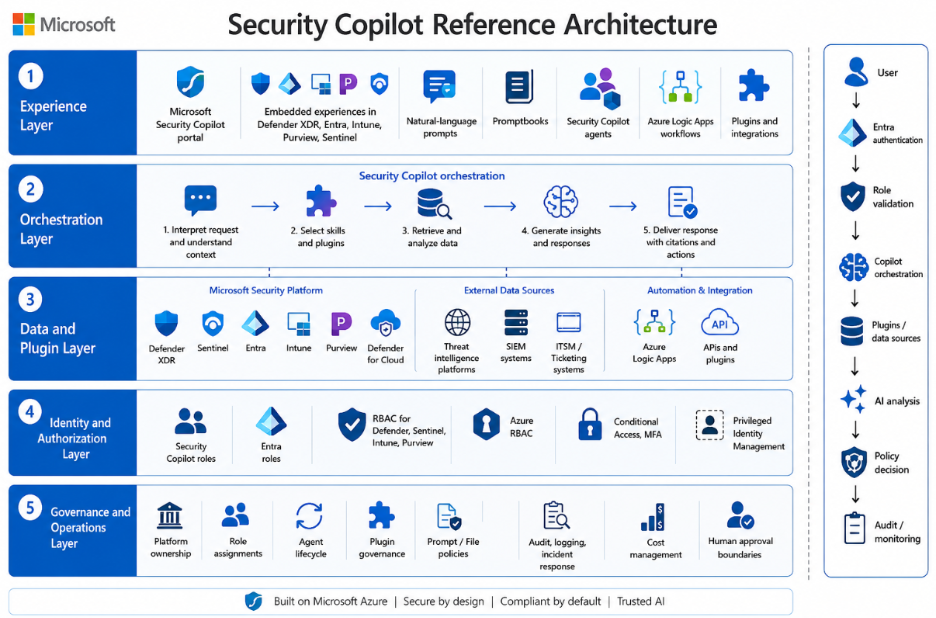
A practical Security Copilot architecture contains five layers.

Experience layer

Users and security workflows can interact with Security Copilot through:

  • The standalone Microsoft Security Copilot portal.
  • Embedded experiences within supported Microsoft security products, including Microsoft Defender XDR, Microsoft Entra, Microsoft Intune, Microsoft Purview, and Microsoft Sentinel.
  • Natural-language prompts.
  • Promptbooks.
  • Security Copilot agents.
  • Supported Azure Logic Apps and automation workflows.
  • Approved plugins and custom integrations.

Orchestration layer

Security Copilot interprets the user, promptbook, workflow, or agent request and selects the relevant skills, plugins, and connected data sources. It then analyzes the available information and produces a response, recommendation, investigation summary, enrichment result, or proposed action.

The quality of the result depends on the user’s permissions, available data, plugin configuration, prompt design, and the accuracy and freshness of the connected data sources.

Data and plugin layer

Depending on licensing, configuration, supported integrations, and user permissions, Security Copilot can access or interact with:

  • Microsoft Defender XDR.
  • Microsoft Sentinel.
  • Microsoft Entra.
  • Microsoft Intune.
  • Microsoft Purview.
  • Microsoft Defender for Cloud.
  • Threat-intelligence platforms.
  • Security information and event management platforms.
  • IT service-management and ticketing systems.
  • Azure Logic Apps workflows.
  • Approved Microsoft, third-party, and custom plugins.
  • Approved APIs and external data sources.

Every plugin, connector, workflow, or custom API expands the organization’s data-access and trust boundary. Each integration should therefore be reviewed for permissions, data flow, authentication, logging, error handling, and write capabilities before production use.

Identity and authorization layer

Access to Security Copilot and connected organizational data depends on multiple authorization layers:

  • Security Copilot roles, including Owner and Contributor access.
  • Microsoft Entra roles and permissions.
  • Product-specific RBAC within Defender, Sentinel, Intune, Purview, and other connected services.
  • Azure RBAC for capacity resources, subscriptions, resource groups, and Logic Apps.
  • User-delegated permissions.
  • Agent, application, service-principal, managed-identity, and connector permissions.
  • Conditional Access and multifactor authentication.
  • Privileged Identity Management for elevated administrative access.

Security Copilot does not bypass the authorization controls of connected Microsoft or third-party services. A user or agent can only access data and perform actions permitted by the underlying service and configured integration.

Governance and operations layer

This layer covers:

  • Platform ownership and service accountability.
  • Security Copilot role assignments.
  • Agent lifecycle management.
  • Plugin and connector governance.
  • Prompt and file-upload policies.
  • Data-sharing and privacy settings.
  • Audit, logging, and investigation visibility.
  • Capacity, overage, budget, and cost management.
  • Change and release management.
  • Human-approval requirements.
  • Automated-action boundaries.
  • Incident response and service continuity.
  • Manual fallback and rollback procedures.
  • Regular access, agent, and plugin recertification.

A simplified data flow is:

User, promptbook, event, workflow, or agent trigger 
↓ 
Microsoft Entra authentication and Conditional Access 
↓ 
Security Copilot role and underlying product-permission validation 
↓ 
Security Copilot orchestration 
↓ 
Approved plugins, connectors, workflows, and data sources 
↓ 
AI-assisted analysis, enrichment, recommendation, or proposed action 
↓ 
Policy-based decision: human approval or approved automated action 
↓ 
Audit, monitoring, capacity tracking, incident review, and continuous improvement

You’ve finished this article. Continue with Design RBAC Before Enabling Microsoft Security Copilot Users to learn the next step.



Design RBAC Before Enabling Microsoft Security Copilot Users

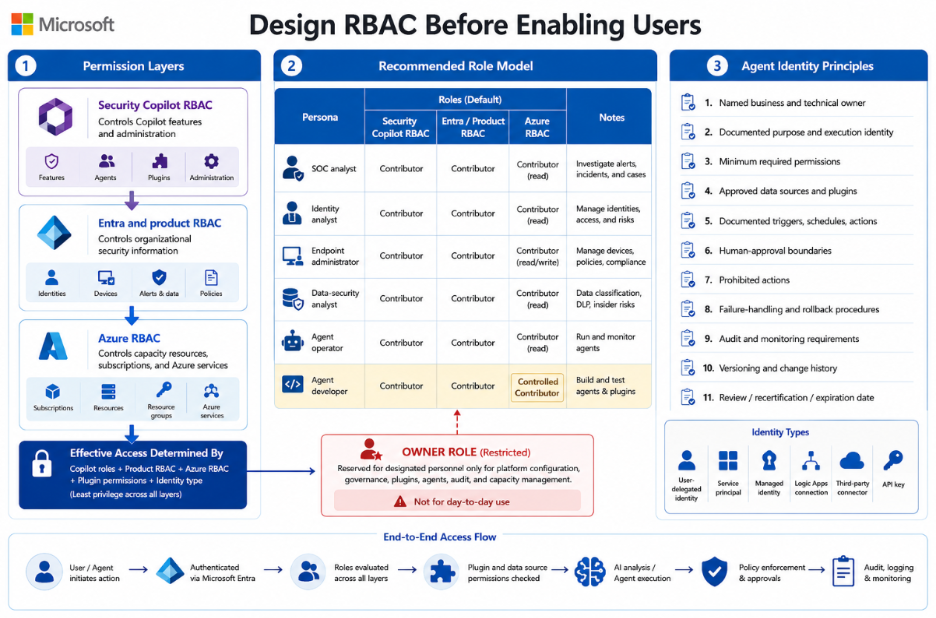
Security Copilot access and underlying workload access should be designed separately. For example, assigning the Security Copilot Contributor role allows a user to work within Security Copilot, but it does not automatically grant access to Defender incidents, Sentinel workspaces, Entra sign-in data, Intune devices, or Purview investigations.

The effective access available through Security Copilot is determined by the combination of Security Copilot roles, connected-product permissions, Azure permissions, plugin permissions, and the identity used by the user, agent, connector, or workflow.

Permission layerPurpose
Security Copilot RBACControls access to Copilot features and administration
Entra and product RBACControls access to organizational security information
Azure RBACControls capacity resources, subscriptions, and related Azure services

Recommended role model

PersonaSecurity Copilot role
SOC analystContributor
Identity analystContributor
Endpoint administratorContributor
Data-security analystContributor
Agent operatorContributor, where required
Agent developerControlled Contributor access

Security Copilot Owner access should be limited to designated personnel responsible for platform configuration, role assignments, plugins, agents, audit settings, capacity, and service governance.

Owner access should not be assigned as a standard day-to-day role. Where possible, privileged access should be activated through Microsoft Entra Privileged Identity Management, protected by phishing-resistant authentication, and reviewed regularly. 

Agent identity principles

Every production agent should have:

  • A named business owner.
  • A named technical owner.
  • A clearly documented purpose and expected outcome.
  • A defined execution identity.
  • Minimum required permissions.
  • Approved data sources and plugins.
  • Documented triggers, schedules, and actions.
  • Defined human-approval boundaries.
  • Clear prohibited actions.
  • Tested failure-handling and rollback procedures.
  • Audit and monitoring requirements.
  • A version number and change history.
  • A review, recertification, or expiration date.

Before production approval, the organization should also document whether the agent operates through:

  • User-delegated permissions.
  • A service principal or application identity.
  • A managed identity.
  • An Azure Logic Apps connection.
  • A third-party connector.
  • An API key or stored credential.

Both the Security Copilot permissions and the effective permissions within every connected system should be reviewed.

You’ve finished this article. Continue with Govern Security Copilot Plugins, Data, and Audit to learn the next step.

Govern Security Copilot Plugins, Data, and Audit

Plugins extend Security Copilot by providing additional data, skills, and actions. However, every plugin also introduces a new trust relationship and may expose sensitive organizational data to another Microsoft service, third-party platform, API, workflow, or credential store. 

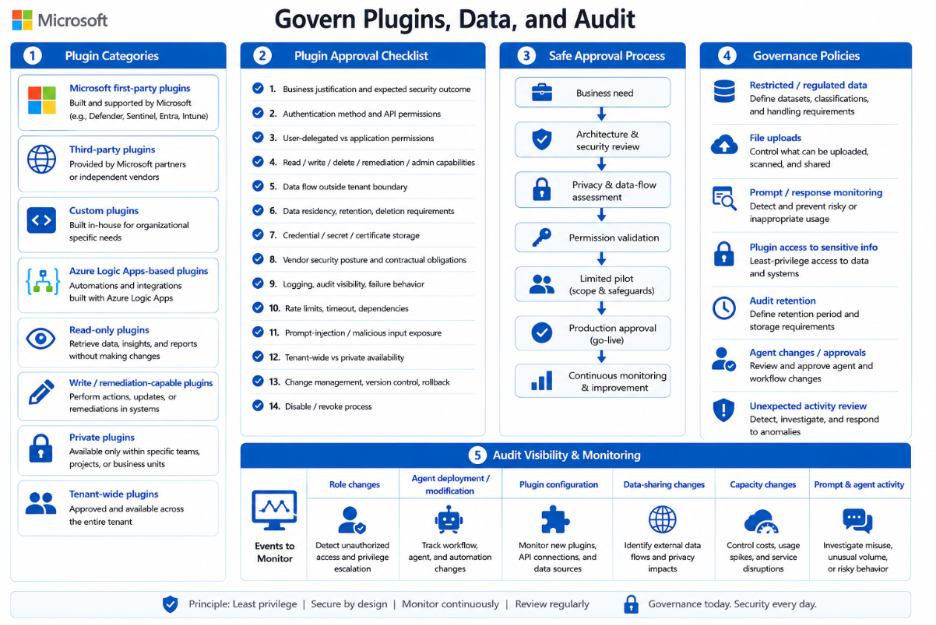
Organizations should distinguish between:

  • Microsoft first-party plugins.
  • Third-party plugins.
  • Custom plugins.
  • Azure Logic Apps-based plugins.
  • Read-only plugins.
  • Plugins that can perform write or remediation actions.
  • Private plugins.
  • Plugins published for broader tenant use.

Before approving a plugin, connector, workflow, or custom API, review:

  • The business justification and expected security outcome.
  • Authentication method and API permissions.
  • User-delegated versus application permissions.
  • Read, write, delete, remediation, and administrative capabilities.
  • Data transmitted outside the Microsoft tenant or service boundary.
  • Data residency, retention, and deletion requirements.
  • Credential, secret, certificate, and connection storage.
  • Vendor security posture and contractual obligations.
  • Logging, audit visibility, and failure behaviour.
  • Rate limits, timeout behaviour, and service dependencies.
  • Prompt-injection and malicious-input exposure.
  • Tenant-wide versus private availability.
  • Change management, version control, and rollback capability.
  • The process for disabling or revoking the integration.

A safe approval process is:

Business need 
    ↓ 
Architecture and security review 
    ↓ 
Privacy and data-flow assessment 
    ↓ 
Permission validation 
    ↓ 
Limited pilot 
    ↓ 
Production approval 
    ↓ 
Continuous monitoring

Organizations should also define what users may enter into Security Copilot prompts.

Governance policies should address:

  • Restricted and regulated data.
  • File uploads.
  • Prompt and response monitoring.
  • Plugin access to sensitive information.
  • Audit retention.
  • Agent changes and approvals.
  • Review of unexpected activity.

Audit visibility can be supported through Microsoft Purview auditing, DSPM for AI, and related management APIs, depending on licensing and configuration.

At minimum, monitor:

EventWhy it matters
Role changesDetect excessive or unauthorized access
Agent deployment or modificationTrack autonomous workflow changes
Plugin configurationMonitor new data connections
Data-sharing changesIdentify privacy-impacting configuration
Capacity changesControl unexpected cost or service interruption
Prompt and agent activityInvestigate misuse and unusual volume

You’ve finished this article. Continue with Plan Microsoft Security Copilot Capacity Around Workloads to learn the next step.


Plan Microsoft Security Copilot Capacity Around Workloads


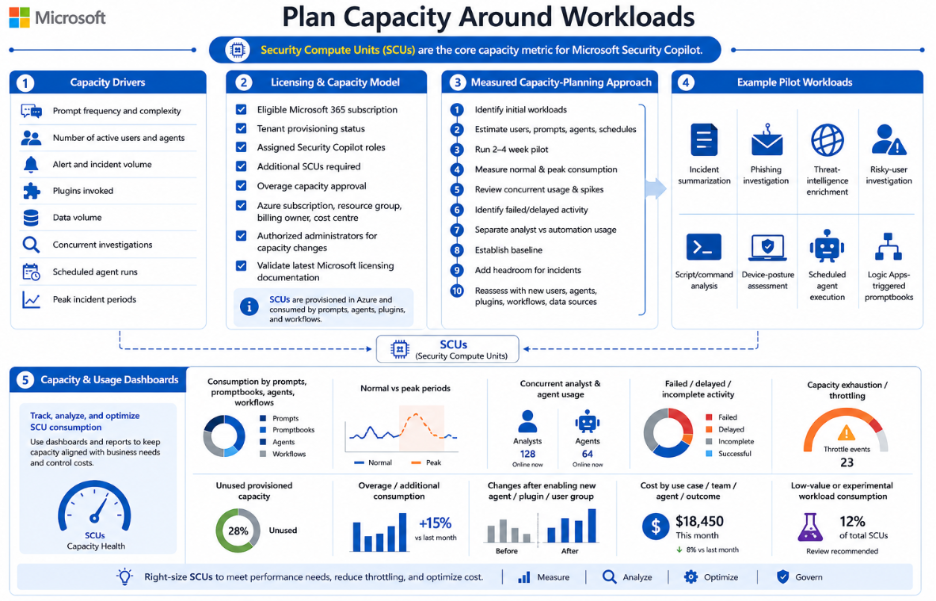
Security Copilot capacity is measured in Security Compute Units.

Capacity consumption depends on:

  • Prompt frequency and complexity.
  • Number of active users and agents.
  • Alert and incident volume.
  • Plugins invoked.
  • Data volume.
  • Concurrent investigations.
  • Scheduled agent runs.
  • Peak incident periods.

Confirm the licensing and capacity model

Security Copilot availability and capacity depend on the organization’s current Microsoft licensing and capacity model.

Before deployment, confirm:

  • Whether the tenant is entitled to Security Copilot through an eligible Microsoft 365 subscription.
  • Whether Security Copilot has already been provisioned or enabled in the tenant.
  • Which users or groups received Security Copilot roles.
  • Whether additional provisioned Security Compute Units are required.
  • Whether overage capacity is permitted and financially approved.
  • Which Azure subscription, resource group, billing owner, and cost centre will own billable capacity.
  • Which administrators are authorized to increase, reduce, or remove capacity.

Because licensing, included capacity, provisioning, and overage terms may change, organizations should validate the latest Microsoft licensing and capacity documentation during design and before production rollout.

Use a measured capacity-planning approach

Security Copilot should be sized through measured pilot usage rather than employee count or an assumed SCU-per-prompt formula.

A practical sizing approach is:

  1. Identify the initial Security Copilot workloads.
  1. Estimate the expected number of users, prompts, promptbooks, agents, and scheduled executions.
  1. Run a representative pilot for two to four weeks.
  1. Measure normal and peak capacity consumption.
  1. Review concurrent usage and incident-spike behavior.
  1. Identify failed or delayed activity caused by insufficient capacity.
  1. Separate interactive analyst usage from scheduled agent and automation consumption.
  1. Establish an operational baseline.
  1. Add approved headroom for major incidents and peak periods.
  1. Reassess capacity whenever new users, agents, plugins, workflows, or data sources are introduced.

Example pilot workloads may include:

  • Incident summarization.
  • Phishing investigation.
  • Threat-intelligence enrichment.
  • Risky-user investigation.
  • Script and command analysis.
  • Device-posture assessment.
  • Scheduled agent execution.
  • Logic Apps-triggered promptbooks.

Capacity and usage dashboards should be reviewed for:

  • Consumption by interactive prompts, promptbooks, agents, and automated workflows.
  • Normal versus peak consumption periods.
  • Concurrent analyst and agent usage.
  • Failed, delayed, or incomplete activity.
  • Capacity exhaustion or throttling.
  • Unused provisioned capacity.
  • Overage or additional consumption.
  • Consumption changes after enabling a new agent, plugin, or user group.
  • Cost by use case, team, agent, or operational outcome.
  • Capacity consumed by low-value or experimental workloads.

You’ve finished this article. Continue with Adopt Microsoft Security Copilot Through a Controlled Rollout to learn the next step.

Adopt Microsoft Security Copilot Through a Controlled Rollout


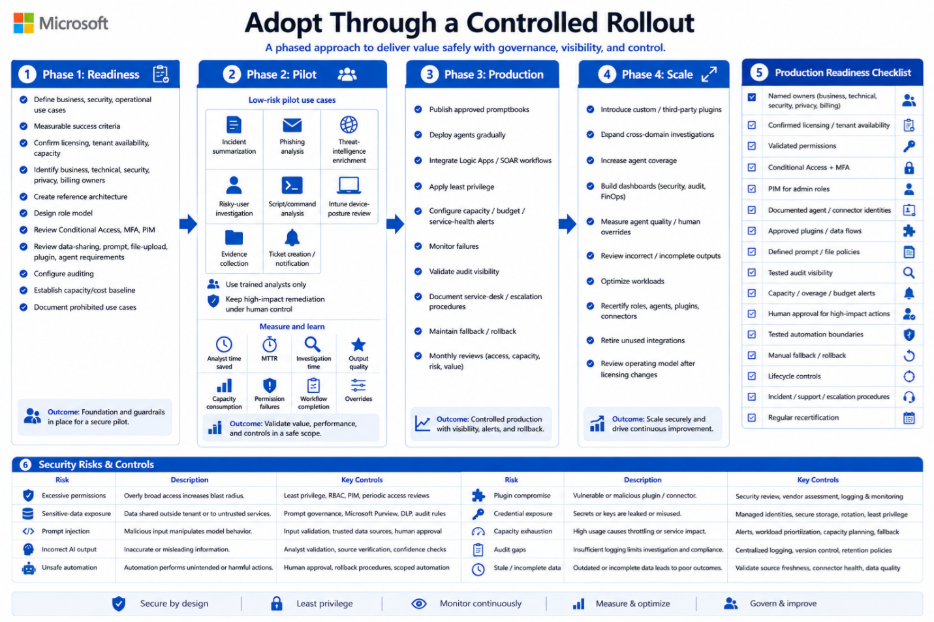
Phase 1: Readiness

  • Define business, security, and operational use cases.
  • Define measurable success criteria.
  • Confirm licensing, tenant availability, and capacity options.
  • Confirm whether Security Copilot has already been provisioned.
  • Identify business, technical, security, privacy, and billing owners.
  • Create the reference architecture.
  • Design the Security Copilot and underlying product-role model.
  • Review Conditional Access, MFA, and PIM requirements.
  • Review data-sharing, prompt, file-upload, plugin, and agent requirements.
  • Configure and validate auditing.
  • Establish an initial capacity and cost baseline.
  • Document prohibited use cases and high-impact actions.

Phase 2: Pilot

Begin with low-risk, measurable use cases such as:

  • Incident summarization.
  • Phishing-email analysis.
  • Threat-intelligence enrichment.
  • Risky-user investigation.
  • Script and command analysis.
  • Intune device-posture review.
  • Evidence collection.
  • Ticket creation and notification.

Use a limited group of trained analysts. Keep identity disabling, device isolation, policy modification, data deletion, access revocation, and other high-impact remediation actions under human control.

During the pilot, measure:

  • Analyst time saved.
  • Mean time to triage.
  • Mean time to investigate.
  • Output quality and required corrections.
  • Capacity consumption.
  • Permission failures.
  • Agent and workflow completion rates.
  • Human overrides.
  • Unsupported or incorrect conclusions.

Phase 3: Production

  • Publish approved and version-controlled promptbooks.
  • Deploy approved agents gradually.
  • Integrate approved Azure Logic Apps and SOAR workflows.
  • Apply least-privilege access.
  • Configure capacity, budget, and service-health alerts.
  • Monitor agent, plugin, and workflow failures.
  • Validate audit visibility.
  • Document service-desk and escalation procedures.
  • Maintain manual fallback and rollback procedures.
  • Conduct monthly access, capacity, risk, and value reviews.

Phase 4: Scale

  • Introduce approved custom and third-party plugins.
  • Expand cross-domain investigations.
  • Increase agent coverage based on measured value.
  • Build security, audit, operational, and FinOps dashboards.
  • Measure agent completion quality and human-override rates.
  • Review incorrect, incomplete, and unsupported outputs.
  • Optimize low-value or high-consumption workloads.
  • Recertify roles, agents, plugins, connectors, and workflows regularly.
  • Retire unused agents and integrations.
  • Review the operating model after major platform or licensing changes.

Production readiness checklist

A production Security Copilot service should not proceed without:

  • Named business, technical, security, privacy, and billing owners.
  • Confirmed licensing and tenant availability.
  • Validated Security Copilot and underlying product permissions.
  • Conditional Access and MFA protection.
  • PIM for privileged administrative roles.
  • Documented agent and connector identities.
  • Approved plugins and data flows.
  • Defined prompt and file-upload policies.
  • Tested audit and investigation visibility.
  • Capacity, overage, budget, and alert thresholds.
  • Human-approval requirements for high-impact actions.
  • Tested automated-action boundaries.
  • Manual fallback and rollback procedures.
  • Agent, plugin, connector, and workflow lifecycle controls.
  • Documented incident, support, and escalation procedures.
  • Regular role, agent, and integration recertification.

Security Risks and Control Considerations

Security Copilot introduces risks that should be considered during architecture, pilot, and production reviews.

RiskExampleRecommended control
Excessive permissionsA user retrieves more security data than required for their roleLeast privilege, scoped product RBAC, PIM, and regular access reviews
Sensitive-data exposureA prompt or uploaded file contains confidential or regulated informationPrompt governance, file-upload rules, Purview controls, and restricted audit access
Prompt injectionMalicious content attempts to influence an agent or pluginInput validation, trusted data sources, limited write permissions, and human approval
Incorrect AI outputA generated conclusion appears credible but is incomplete or inaccurateAnalyst validation, source verification, testing, and quality measurement
Unsafe automationAn agent disables an account or changes a policy based on incomplete evidenceHuman approval for high-impact actions and tested rollback procedures
Plugin compromiseA third-party or custom plugin exposes or manipulates dataSecurity review, minimum permissions, vendor assessment, logging, and revocation process
Credential exposureAPI keys or secrets are stored insecurely or written to logsManaged identities, secure secret storage, credential rotation, and log review
Capacity exhaustionScheduled agents consume available capacity during a major incidentCapacity alerts, workload prioritization, overage controls, and manual fallback
Audit gapsAgent or plugin changes cannot be reconstructedCentralized audit logging, change records, version control, and retention policies
Stale or incomplete dataCopilot produces a recommendation using delayed or partial telemetryValidate source freshness, connector health, ingestion status, and data completeness

Conclusion

Microsoft Security Copilot can become an important part of an enterprise security architecture, but only when it is deployed with the same discipline applied to other critical security platforms.

A secure and sustainable implementation should combine:

  • Layered role-based access control.
  • Least-privilege user and agent identities.
  • Controlled plugins, connectors, and workflows.
  • Clear prompt and data-protection policies.
  • Audit and investigation visibility.
  • Workload-based capacity and cost planning.
  • Human approval for high-impact actions.
  • Controlled automation for low-risk activities.
  • Manual fallback and rollback procedures.
  • Continuous measurement and improvement.

The most successful organizations will not necessarily be those that deploy the largest number of agents or automate the highest number of tasks. They will be the organizations that connect Security Copilot to measurable security outcomes while keeping the platform secure, governed, observable, resilient, and financially controlled.

You’ve finished this article. Continue with Deploying Microsoft Security Copilot Securely to learn the next step.