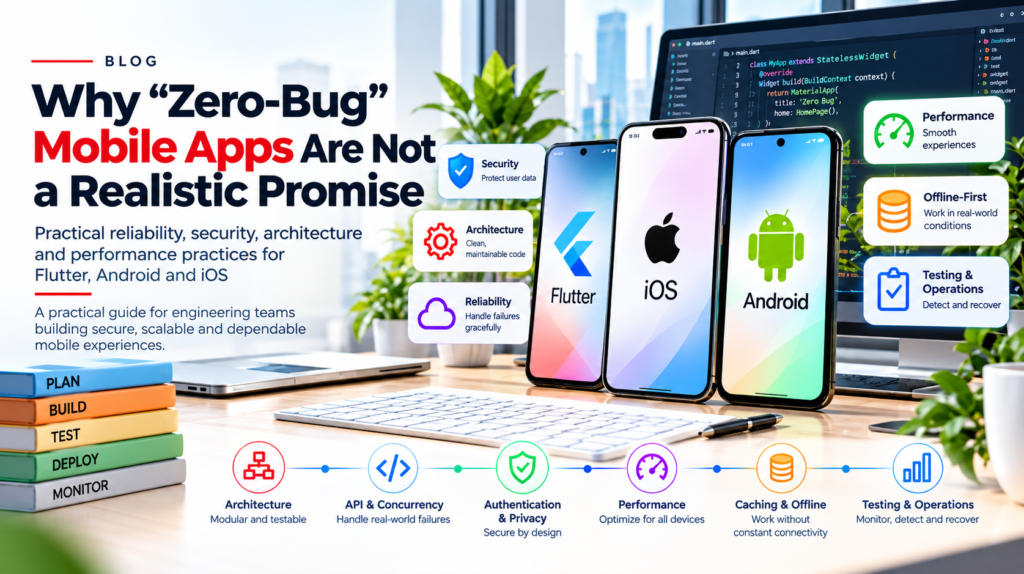
Practical reliability, security, architecture and performance practices for Flutter, Android and iOS
The core idea
No realistic engineering process can guarantee zero defects across every device, operating-system version, network condition and user journey. Strong teams reduce foreseeable risk, detect failures quickly and design safe recovery paths.
Prepared for the DeepCoder company blog | Editorial version for technical review
Executive summary
Mobile applications operate in an unpredictable environment: networks drop, operating systems suspend or terminate processes, credentials expire, devices vary, and backend responses arrive out of order. These are not edge cases to ignore; they are normal conditions to design for.
This guide explains recurring production problems and practical approaches across Flutter, native Android and native iOS. It focuses on engineering decisions that make behavior easier to reason about, test, monitor and recover.
What this guide covers
- Architecture and clear responsibility boundaries
- API concurrency, retries and explicit UI state
- Authentication, privacy and secure session handling
- Performance profiling and offline-first behavior
- Caching, regression prevention and production operations
1. The problems mobile teams repeatedly encounter
An application can work on a developer’s device and still fail under real-world conditions. Common examples include:
- An API succeeds, but the screen continues to display stale data.
- A loading indicator remains visible after a failed request.
- Navigation triggers duplicate requests or competing updates.
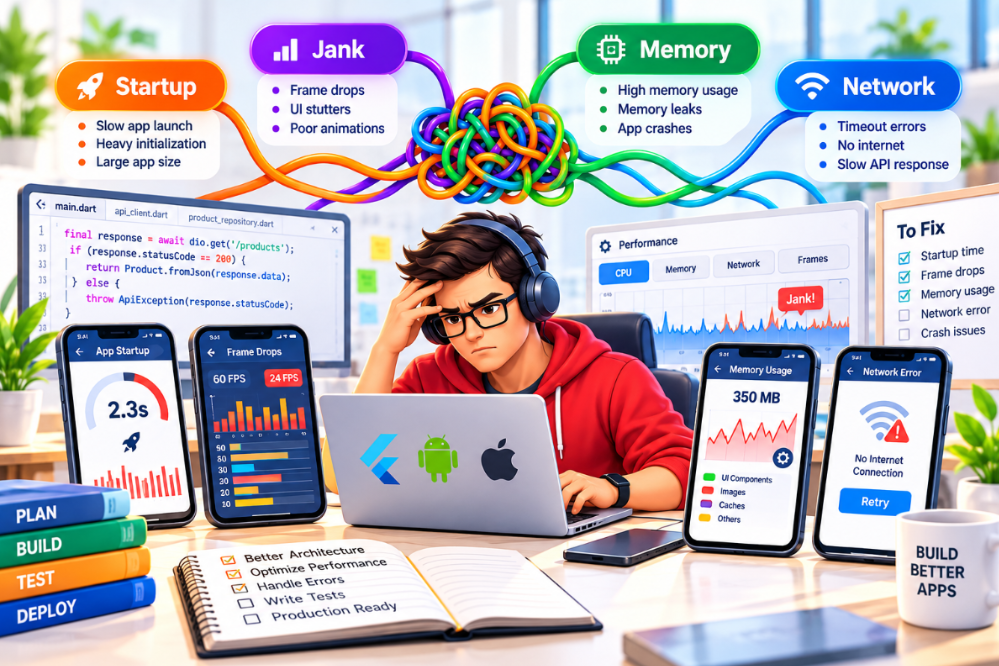
- Images load slowly, scrolling stutters, or memory use grows over time.
- A feature works in a simulator but behaves differently on a physical device.
- Several requests try to refresh an expired access token at once.
- Important input disappears after the operating system terminates the process.
- A new release breaks a previously working user journey.
- Production crashes occur in device and network combinations not represented in testing.
- Coupled code makes a small change risky and expensive.
These issues often come from unclear state ownership, lifecycle assumptions, incomplete failure handling, weak testing, or missing architectural boundaries—not simply from a developer making a mistake.
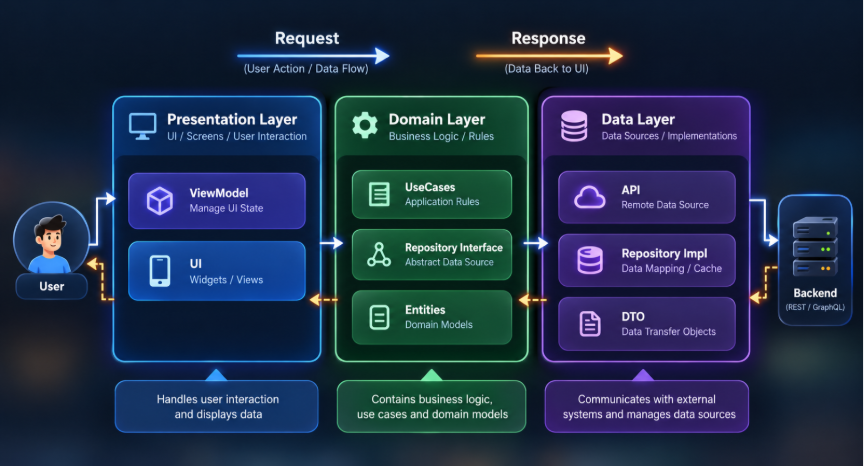
- Architecture: keep responsibilities clear
When screens make network requests, parse responses, manage authentication, store caches and implement business rules in one place, each change can affect unrelated behavior. This may feel fast at first, but the cost rises as the application grows.
A maintainable responsibility model
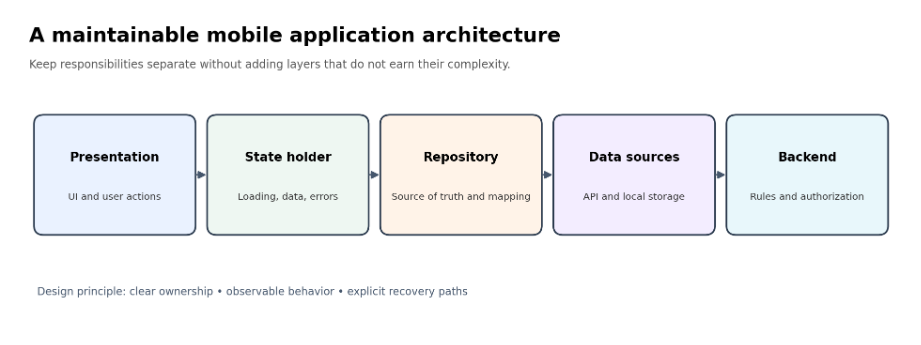
| Layer / component | Primary responsibility |
| Presentation | Renders the interface and captures user actions. |
| State holder | Coordinates loading, success, empty, error, refresh and pagination states. |
| Repository | Defines data access, mapping, caching and source-of-truth rules. |
| Service / data source | Performs API requests and handles transport-level concerns. |
| Local persistence | Stores data or user input that must survive navigation or restart. |
| Backend | Enforces business rules, identity, permissions and data integrity. |
A domain or use-case layer is valuable when business logic is complex, reused, or needs a clear boundary. It is not mandatory for every screen or feature. Prefer the simplest structure that keeps responsibilities testable.
Platform implementation notes
- Flutter: choose a state-management approach such as Riverpod, BLoC or Provider based on team expertise and application needs.
- Android: use lifecycle-aware state collection, commonly with ViewModel and StateFlow in Kotlin applications.
- iOS: use SwiftUI state and observable models where appropriate, and structured concurrency for asynchronous work.
Engineering rule
The goal is not to add the maximum number of layers. The goal is to make ownership, dependencies and failure behavior explicit.
3. API failures, concurrency and stale responses
Imagine a user opens a product screen. The first request times out, the user retries, and the original request later succeeds after the retry has failed. If both responses can freely update the screen, the UI may show an error despite having valid data.
Recommended approach
- Set appropriate connection and response timeouts.
- Represent success, failure, loading and cancellation explicitly.
- Cancel obsolete requests when the networking stack supports it.
- Ignore results that no longer belong to the active request.
- Centralize error translation into actionable user messages.
- Retry only when the failure is transient and the operation is safe to repeat.
- Record correlation/request identifiers where they help diagnose issues.
Illustrative Flutter request-version pattern
int _requestVersion = 0;
Future<void> loadProducts() async {
final version = ++_requestVersion;
state = const AsyncLoading();
final result = await AsyncValue.guard(
() => repository.getProducts(),
);
// Do not let an older request overwrite newer state.
if (version != _requestVersion) return;
state = result;
}
This is an illustrative pattern for a suitable state holder, not a complete production implementation. A real implementation must consider provider disposal, cancellation, whether existing data should remain visible during refresh, and how errors are presented.
Native equivalents: Android teams can use coroutine cancellation and viewModelScope; iOS teams can use task cancellation and appropriate actor isolation, including MainActor where UI state requires it.
Important distinction
Ignoring a stale result protects UI state. It does not necessarily stop the underlying network operation. Cancellation, state ownership and safe retry semantics solve related but different problems.
4. Model UI state deliberately
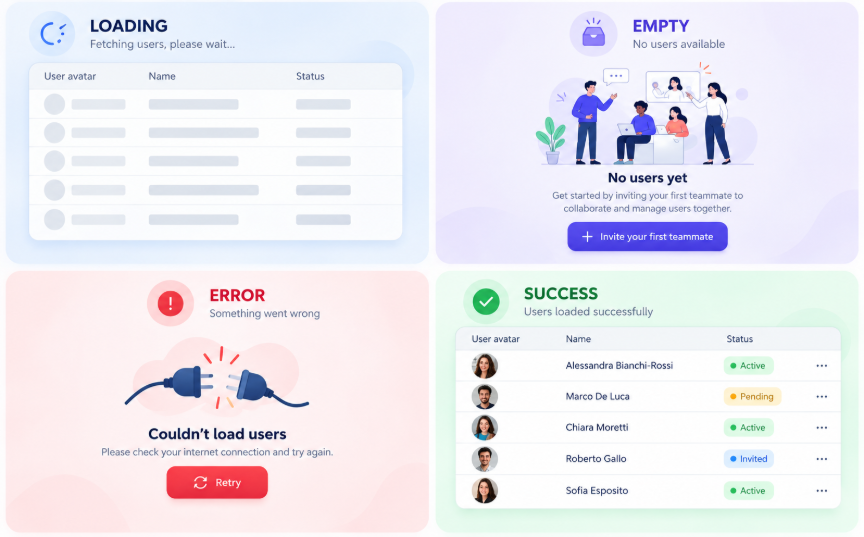
A single isLoading Boolean rarely describes a complex screen. A catalogue may load for the first time, refresh existing data, paginate, apply filters or retry after an error. If every operation shares one flag, one task can hide another task’s progress or accidentally replace valid data.
| State | Expected UI behavior |
| Initial loading | Show a progress indicator or skeleton. |
| Loaded | Display current data and available actions. |
| Empty | Explain that no results are available and offer a useful next step. |
| Error | Show a clear message and a recovery action where appropriate. |
| Refreshing | Keep existing data visible when it is still useful. |
| Loading more | Preserve current items and indicate pagination progress. |
Use immutable state where appropriate and give each asynchronous operation a clear owner. Avoid replacing valid content with an empty list just because a refresh failed.
5. Authentication and session expiry
Session problems can appear while users are navigating, uploading files or submitting forms. Multiple requests may attempt token refresh simultaneously; an invalid refresh token may trigger an endless retry loop; and sensitive values can leak through diagnostic logs.
A safer session-handling pattern
- Store credentials using platform-appropriate secure storage, such as Keychain on Apple platforms and Android Keystore-backed protection.
- Centralize token and session handling in a well-defined networking/authentication layer.
- Coordinate refresh so concurrent requests can await one shared refresh operation where appropriate.
- Retry an original request only when its semantics permit it; do not blindly repeat non-idempotent operations.
- On invalid credentials, stop refresh loops and transition to a clear re-authentication state.
- Redact access tokens, refresh tokens, passwords and sensitive personal data from logs.
- Enforce authorization on the server for every protected operation.
Security principle
Authentication establishes who or what is making a request. Authorization determines what it may do. A mobile client must never be the sole authority for permissions.
6. Performance: measure before optimizing
An app can look efficient in code review yet feel slow on real devices. Typical causes include work on the main thread, excessive UI rebuilds, oversized image decoding, unbounded lists, repeated network calls, expensive startup work, or resources retained longer than necessary.
A practical optimization workflow
- Define representative devices, operating-system versions and user journeys.
- Measure startup time, frame rendering, memory, network latency and crash rates before changing code.
- Use lazy lists and appropriately sized image assets.
- Reduce unnecessary state changes and UI rebuilds.
- Move suitable CPU-intensive work away from the main thread.
- Defer nonessential initialization until it is needed.
- Compare measurements before and after each optimization and retain the evidence.
| Platform | Useful profiling and test tools |
| Flutter | Flutter DevTools and performance profiling in profile/release-like builds. |
| Android | Android Studio Profiler, system tracing and Macrobenchmark where appropriate. |
| iOS | Xcode Instruments and XCTest performance tests. |
Useful indicators include crash-free sessions, startup duration, slow API requests, rendering problems and memory growth. Set targets based on the product, supported hardware and user expectations rather than using one universal threshold.
7. Connectivity loss, process termination and recovery
A connection can disappear during an upload. The operating system can terminate the app. A server may complete an operation even if the client never receives the response. Reliable apps account for these situations explicitly.
- Persist important user input when the product’s privacy and data-retention rules allow it.
- Distinguish network failures from validation, authentication and authorization errors.
- Use local storage for information that genuinely needs offline access.
- Define freshness and synchronization policies instead of treating every cached value as current.
- Use platform-supported background-work mechanisms and respect their execution limits.
- Make retries safe against duplicate execution, particularly for payments and other critical actions.
- Restore the user to a meaningful state after process recreation.
For critical operations, use server-supported idempotency keys where appropriate and verify transaction status with the backend. A disabled button or client-side loading flag alone cannot guarantee that an operation will run only once.
8. Caching and offline-first data
Caching can improve responsiveness and reduce unnecessary requests, but incorrect caching can display misleading information. Define the source of truth and freshness policy for each type of data.
Practical caching decisions
- Use in-memory caching for short-lived data that benefits from fast reuse.
- Use a local database for structured data that must survive navigation or restart.
- Define expiration, invalidation and refresh behavior.
- Keep the UI connected to a clear source of truth.
- Specify how conflicts are handled when local and remote data differ.
- Make offline behavior visible so users understand whether changes are saved or synchronized.
Example
A product catalogue may display cached descriptions immediately, while price and stock availability may require fresh server validation before checkout. The correct policy depends on business rules and the consequences of stale data.
9. Regression prevention and testing
A change can break a different feature when components share hidden state, services have side effects, or assumptions are not covered by tests. Testing should follow the system’s boundaries and prioritize critical user journeys.
- Unit-test business rules, validation and data transformations.
- Test repositories with controlled or fake data sources.
- Cover loading, error, refresh, cancellation and pagination transitions.
- Test navigation and critical end-to-end user journeys.
- Verify integration with backend services and local persistence.
- Add a regression test for each significant production defect when practical.
- Run static analysis, dependency checks and automated tests in CI.
Combine test types instead of relying on one large UI test suite. The appropriate balance depends on risk, release frequency and the application’s architecture.
10. Avoid over-engineering
Good architecture does not mean creating an abstraction for every class. Excessive layers, custom networking frameworks, global state and premature caching can make a small application harder to understand.
- Start with a typed network client and consistent error handling.
- Implement one complete feature with clear state ownership and a repository where useful.
- Add loading, empty, error and success states.
- Introduce persistence, pagination and offline behavior when requirements justify them.
- Test normal and failure paths.
- Profile performance and extract only patterns that prove reusable.
The best reusable foundation is a small set of validated engineering defaults, not a large collection of abstractions.
11. A production-readiness process
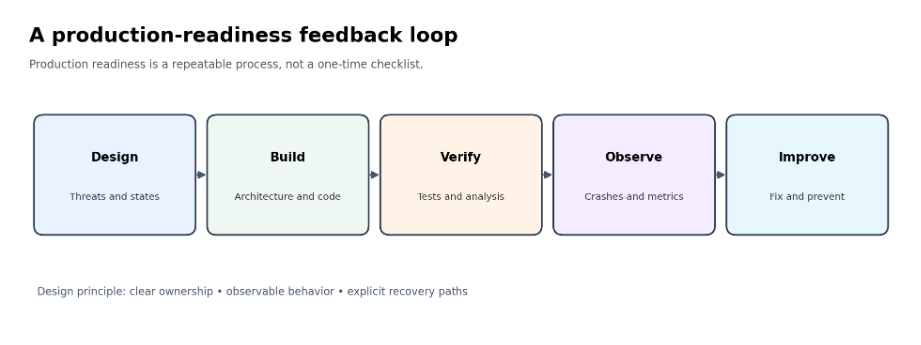
| Stage | Questions to answer |
| Architecture | Are feature boundaries, dependencies, state ownership and data flow clear? |
| Correctness and resilience | Are errors, concurrency, cancellation, authentication and recovery handled? |
| Performance | Have representative devices been profiled against agreed targets? |
| Verification | Do automated tests, static analysis and build checks cover critical risks? |
| Production operations | Can the team detect issues, assess rollout health and roll back safely? |
Treat production readiness as a recurring process. Review results after releases and feed production findings back into engineering priorities.
12. What production-ready really means
A production-ready application should be able to demonstrate that it:
- Handles expected failures without unnecessary crashes.
- Preserves important state when required.
- Prevents duplicate execution of critical operations through appropriate safeguards.
- Handles slow, unreliable and interrupted networks.
- Protects credentials and sensitive information.
- Performs acceptably on supported devices.
- Has automated coverage for critical workflows.
- Provides actionable diagnostics when unexpected failures occur.
- Can be released, monitored and rolled back through a controlled process.
A realistic promise
No checklist can guarantee zero defects. Production readiness means reducing foreseeable risks and having the mechanisms to detect, diagnose and recover from the risks that remain.
Frequently asked questions
Can a mobile app be completely bug-free?
No process can guarantee zero defects across all devices, operating-system versions, network conditions and user behavior. Teams can reduce risk through design, testing, monitoring and recovery.
Should an enterprise choose Flutter or native development?
Choose based on product requirements, platform-specific capabilities, user experience, performance needs, delivery model and team expertise. There is no universal winner.
How can a team improve mobile app reliability?
Use clear state ownership, robust networking, secure session handling, automated regression tests, recovery strategies, production monitoring and controlled releases.
What should be measured when optimizing mobile performance?
Measure the user journeys that matter, including startup, rendering, memory use, network latency and crashes. Establish baselines and compare changes on representative devices.
How should an app handle offline work?
Define which data can be cached, which actions can be queued, how conflicts are resolved, and when server confirmation is required. Make synchronization status clear to users.
How DeepCoder can help
Building dependable mobile experiences requires a combination of sound architecture, platform expertise, security-aware engineering, performance measurement and disciplined testing. DeepCoder works across enterprise technology and application engineering needs; organizations planning a new mobile product or improving an existing application can discuss their requirements with the team.
Start a conversation
Website: https://www.DeepCoder.io
Email: [email protected]
Conclusion
Production-ready mobile development is not about using more libraries or building the most complicated architecture. It is about making sound engineering decisions, measuring real behavior, testing failure paths and designing systems that recover safely.
Across Flutter, Android and iOS, build with clear ownership, protect sensitive data, profile before optimizing, test continuously and learn from production signals. That is how teams create mobile applications that are more reliable, maintainable and worthy of users’ trust.
Editorial note: Platform APIs and recommended practices evolve. Before publication, have a mobile engineering SME verify code samples and link the article to current official Flutter, Android and Apple documentation.